Preserve textured hair during an AI portrait edit
You asked for a new background and got one, along with a different set of curls. A background edit can quietly straighten, tidy or redraw textured hair, and it often looks so plausible you only notice next to the original.
What you'll make
an edited portrait whose hairline, curl pattern and outline you’ve checked against the original, or a clear decision to repair the edge, restart or retake.
What you'll need
a photo of yourself, or of someone who has agreed, with the whole of the hair in the frame, that your organisation lets you use in an image editor. ChatGPT and Gemini both edit an uploaded photo. Keep the untouched original next to every candidate. Allow about 15 minutes.
Example result.
Hairline and parting: same
Curl pattern: same size and direction of curls; flyaways kept
Outline: same width on both sides; no new volume
Edge against the new background: soft, no pale halo or hard cut-out
Decision: use it
1. Tell the editor to keep the hair as photographed
Attach the original and say exactly what changes. Then name the parts of the hair that stay:
Edit my attached portrait for [change you need]. Keep the hairline,
parting, curl pattern, volume, length and outline exactly as in the
photo, along with the face, expression and pose. Keep the natural soft
edge and flyaway strands. No straightening, smoothing, tidying, extra
volume or new accessories. Don't invent hair the photo doesn't show.
If the photo cuts off the hair, tell me. Make one candidate.
[change you need] is the actual job, such as “a plain blue-grey studio background”.
Avoid “neat”, “polished” or “professional hair” unless you want the hair changed: those words invite a different shape or texture. If the original cuts off the top or sides of the hair, a wider frame can add background but not the missing hair. Use a photo that shows it all.
Why this works: the editor treats hair as part of the scene it’s redrawing. Naming the hairline, curl pattern and outline separately gives it three things to keep, and gives you three things to check.
What you should see: one candidate with the new background and hair you can compare part by part with the original.
2. Compare the hair part by part
Put the original and the candidate side by side at the same size and check:
- Hairline and parting: the same shape at the forehead, the parting in the same place.
- Curl pattern: curls of the same size and direction, not redrawn into neater, more even ringlets.
- Outline: the same width on each side and at the top, with no added volume.
- Edge: look closely where hair meets the new background for a pale outline (halo), a hard cut-out line, or patches of the old background showing through.
Then view it small. A detailed edge can look fine enlarged and disappear in a profile circle; the profile circle guide covers that check.
Why this works: the four checks catch different failures. An edit can keep the outline but redraw every curl inside it, or keep the curls and add a halo around them.
What you should see: a note for each part, like the example result.
3. Decide: use it, repair the edge or restart
If everything matches, use it. If only the edge has a halo or hard line, repair that edge. If the curls or hairline have changed, go back to the original with a narrower request rather than asking the editor to fix its own redraw. For a real portrait, the person should see the result: “matches the rest of the team” is a style call, not their approval of how their hair looks.
Why this works: an edge repair is a small, local change. Redrawn curls mean the editor treated the hair as something to design, and repairing that usually redraws it again.
What you should see: one clear decision, and at most one repair request.
Check the result
- The hairline and parting match the original.
- Curls are the same size, direction and density, including flyaways.
- The outline is the same width on each side.
- The edge against the background has no halo, hard line or leftover old background.
The usual failure: the hair looks great and isn’t quite the same hair. Curls are redrawn into a tidier, more even pattern, the fringe moves and one side gains volume. Spot it by comparing a single distinctive curl or the parting, not the overall impression. If it’s only the edge that’s wrong, repair that:
Keep the face and the new background. Along [hair edge], the candidate
has [problem]. Use my untouched original for the hair's shape, curl
pattern and hairline. Repair only that edge. Don't smooth the face,
change the curls or add hair the photo doesn't show. Make one candidate.
[hair edge] is where, such as “the left side above the ear”. [problem] is what you see, such as “a pale halo” or “a hard cut-out line”. If the editor changes the hairline while fixing the edge, reject it and restart, or use a conventional masking tool. The background halo guide explains that choice.
Worked example: red curls and a blue door
Fictional example. The source is a woman with chin-length red curls in front of a blue door and a brick wall. She asked for a plain blue-grey background:
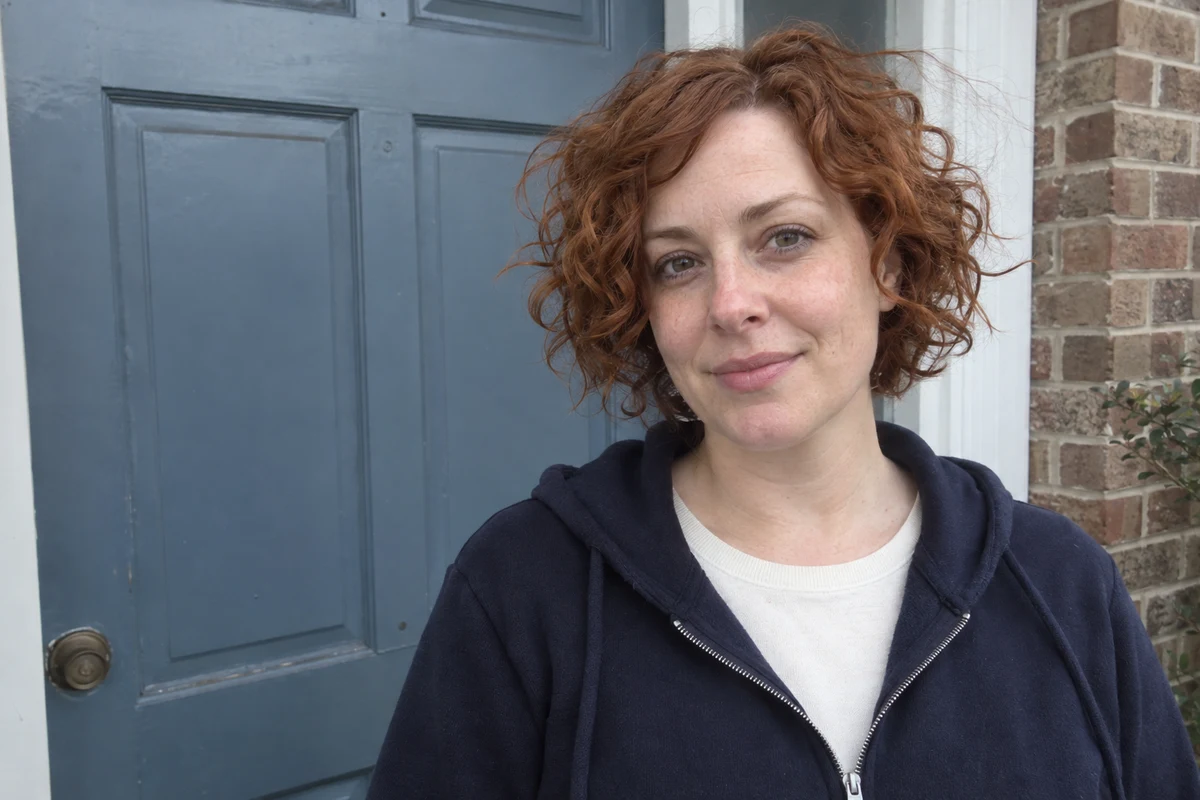
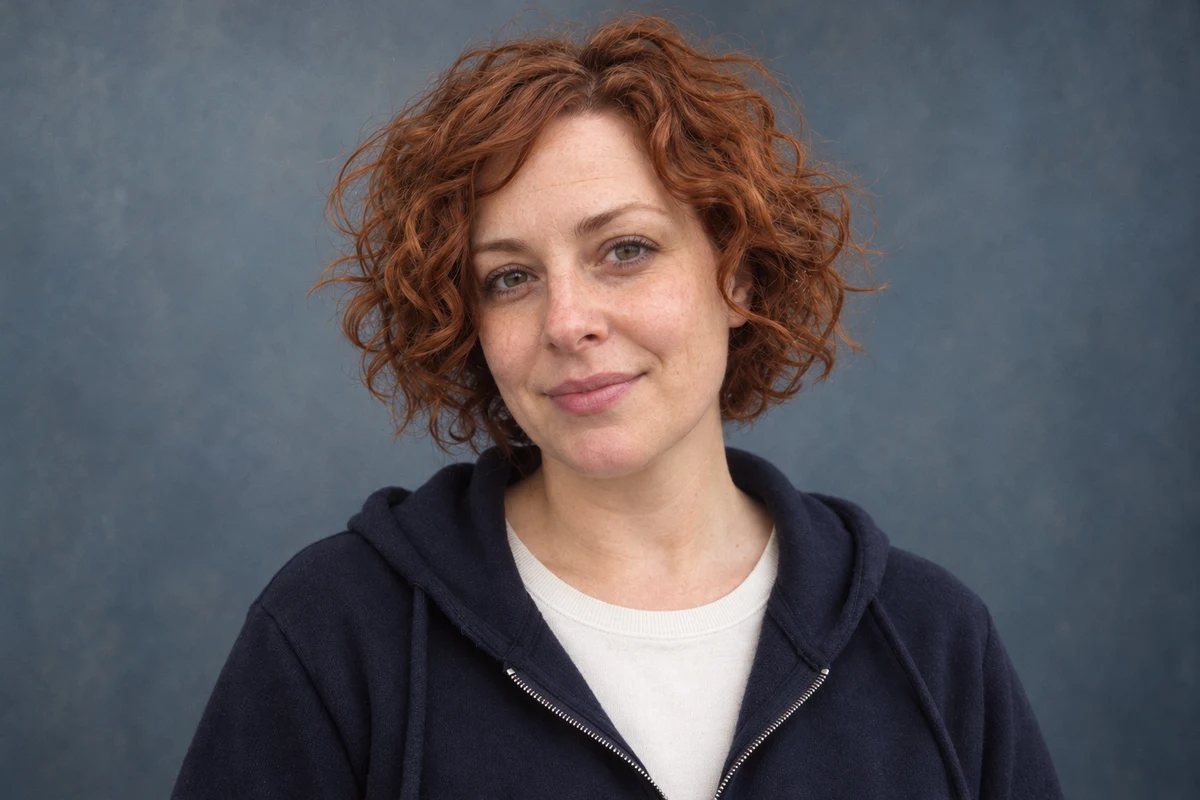
- The background and face are right. The door and bricks are gone; the face, freckles, expression and hoodie match, with slightly warmer light.
- The curls are not the same curls. Length and colour match, but the curls are more defined and evenly spaced, the fringe falls differently across the forehead and the hair is fuller on her right. That’s the usual failure: redrawn, not edged.
- The decision is a restart. Because the curl pattern changed, not just the edge, the next request goes back to the original with the step 1 prompt and “keep the fringe’s side sweep and the flyaways on her left” added to the keep list. The edge repair prompt would have been the wrong tool.
Try it
Inspect the silhouette
Name the preservation boundary and compare silhouette, curls and highlights.
Compare one distinctive curl and the parting with the original. A tidier pattern is a different head of hair.
The example in text
- Chin-length red curls with a side-swept fringe
- Flyaway strands on her left
- Soft edge against a blue door
Task kit for this job: Download (ZIP) · Reusable instructions
Go deeper
Add a second photo only for coverage
If another photo of the same person shows the whole of their hair, you can attach it, but say what it’s for: the main photo controls the face and pose, the second shows only the hair’s full outline. Don’t let the editor blend two faces or poses. The portrait reference guide shows how to label each image’s role.
Illustrations simplify hair differently
Clay, line and watercolour styles reduce curls to shapes or strokes. Allow that in the brief, but ask for the same outline, hairline and direction of the curls. Describe the result as an illustration of the hair, not a strand-for-strand match.
Turn a failed edit into a rule
When a check fails, write down the region and the fix, such as “keep the fringe’s side sweep”, and add it to the person’s keep list for next time. Attach the original again each time, so the rule describes their hair rather than an earlier edit’s version of it. The headshot preservation brief covers the full keep list.