Should AI do this task? A practical decision guide
The team has a list of jobs AI could help with. Before you give it the lot, choose one task and decide what a useful, checked result would look like.

What you'll make
a short assessment of one task, with a decision to keep it human-led, gather more evidence, use fixed rules or try supervised AI assistance. You will also have a clear brief and a way to check the first result.
What you'll need
a task you understand, a description your organisation allows you to share and someone who can judge the finished work. A work text chat such as ChatGPT, Claude, Gemini or Copilot can help organise the assessment. You can also complete it yourself. Do not upload the underlying business material until its use is authorised.
Example output
Fictional assessment.
Task: Turn product-meeting notes into a draft internal action list.
Route: Try AI assistance within the work account covered by the policy.
Reason: A reviewer can compare every action with the original notes.
Boundary: Draft only. No ticket changes, messages or release commitments.
Reviewer: The delivery manager who attended the meeting.
Hold for confirmation: Actions missing an owner or necessary deadline.
Next step: Keep the gap visible and ask the meeting participants.
The infographic gives you the route at a glance. The steps below explain how to make the judgement, including what to do when a task contains both useful assistance and a decision that must stay with a person.
For a quick personal stop-or-go screen, see when not to use AI. This guide goes further: it builds a team assessment and a first-test brief you can challenge, then records the total effort of the finished job.
1. Describe one job and its finish line
Start with a task small enough to review completely. “Use AI in customer service” gives you a department to worry about. “Draft an answer to a delivery question using the current order record and company policy” gives you something to assess.
Write down:
- Input: the information the task needs, and where the current version lives.
- Output: what the next person should receive.
- Use: what someone will do with that output.
- Reviewer: who can check it before it is used.
The intended use matters. Summarising notes for your own preparation has different consequences from sending a customer a delivery commitment. A draft can contain a decision even when nobody has pressed Send.
Split mixed tasks. Reading documents, extracting facts, calculating a total, recommending an action and carrying it out are separate jobs. You might use AI for one part and a spreadsheet or qualified person for another.
2. Work through the four checks
First, is the tool and data use allowed?
Check the particular account, the material and the proposed use. An organisation allowing a tool does not automatically allow every document in it. Confirm the relevant policy or ask the person responsible for information security or data protection.
Describe the task without the confidential contents while you settle this. For example, you can say “draft an internal summary of customer complaints” without pasting the complaints. Removing names may still leave identifying details.
If permission is unclear, pause. A model’s assurance that a document is safe to upload does not grant permission.
Could an error cause serious harm?
Consider who could be affected and how the output will be used. Employment decisions, safety instructions, medical advice and substantial financial commitments deserve specialist judgement and appropriate controls.
For an everyday task-selection exercise, keep those decisions human-led. That means a responsible, suitably qualified person evaluates the evidence and can reject the recommendation. Adding a final approval click is not enough if the reviewer cannot assess what came before it.
A supporting task with a clear scope may still be useful. Drafting neutral headings for a recruitment process is a different task from ranking candidates. Assess that smaller task separately, with its own permission and checks.
Can you verify the output before relying on it?
Name the evidence and the person doing the check. “It sounds reasonable” is not a checking method, although it has carried quite a few meeting slides.
A useful check might be comparing actions against meeting notes, recalculating figures in a spreadsheet or having a subject specialist check a technical explanation. For a document-based answer, open the source behind each important claim and confirm that it supports the wording.
Check omissions too. A summary can repeat every included fact correctly while leaving out the exception that changes the decision. A second AI answer can help you look for problems, but agreement between models does not establish truth.
If there is no practical way to check the result, choose assess first. Obtain the missing evidence, narrow the task or involve someone qualified to review it. For a forecast, you can check data, assumptions and past performance; you cannot confirm a future outcome in advance.
Would fixed rules work better?
Use a formula, filter or conventional automation when the input and rule are clear. Adding a column, flagging an exact duplicate reference or routing a known form category need not involve generated prose.
AI may help explain or draft a formula. The calculation should then run in the appropriate tool, with tests for normal, missing and boundary inputs. Check the range and rule as well as the answer. A perfectly executed formula can still be the wrong formula.
Where wording varies and interpretation helps, AI assistance may be worth trying: organising untidy notes, drafting from checked facts or finding questions in a document. Reaching this point means candidate for a supervised test, not permission to automate the whole workflow.
3. Ask for an assessment you can challenge
Open the work chat covered by your policy. Replace the bracketed fields below with a description of the job your policy allows. You do not need to supply customer, employee or commercially sensitive records to assess the workflow.
Help me assess a possible use of AI. Do not carry out the task yet.

Job: [specific task, reader, finished output and intended use]
Material and permission: [input types, current source, account and allowed use, or unknown]
Consequences and checking: [who could be affected, reviewer and evidence, or unknown]
Current method: [formula, filter, procedure or manual route]

Use only this description. Separate the facts in my description from assumptions.
First identify any unresolved permission. Then consider serious harm,
whether the result can be checked, and whether fixed rules fit better.

Return:
1. A provisional route: pause for permission, human-led, assess first,
   use fixed rules, or try supervised AI assistance.
2. The reasons, tied to details in my description, and what remains unknown.
3. Any smaller supporting task that could be assessed separately.
4. A first-test brief: allowed input, exact output, reviewer,
   acceptance checks and conditions for stopping.

Do not infer approval, certify safety or invent a qualified reviewer.
Do not assume a draft may be sent or a proposed action carried out.
If essential evidence is missing, state the question to resolve it.
[Job] describes the task and what the reader will do with its output. [Material and permission] names the source and what your organisation has confirmed. [Consequences and checking] names who could be affected and who can compare the result with evidence. [Current method] gives the alternative you already use. Write “unknown” where you cannot fill in a fact.
The fields expose the things an enthusiastic recommendation can skip. The provisional route gives you a decision to question; the unknowns tell you what to find out next. Keep the permission, evidence and limits on action when adapting the prompt.
4. Test the finished job
For a task cleared by the policy with less serious consequences, start with one case you can check fully. Write the acceptance checks before generating the answer. Include an awkward case, such as a missing deadline or contradictory source, rather than choosing only the cleanest example.
Save the first draft and the corrected result. Record preparation, prompting, checking and correction time. Compare that total with doing a comparable job to the same standard using your current method. Record setup and ongoing costs separately if you are deciding whether to adopt it.
The decision is whether the finished result is useful at an acceptable level of effort and risk. Stop or narrow the task if important errors recur, the checking is impractical or the benefit disappears once corrections are counted. A good first case supports another small trial; it does not establish that the workflow is reliable across the business.
Use the tool-comparison guide if you need to test more than one tool your policy allows. Once you know which tasks matter, the business tool-selection guide helps with the separate account and purchasing decision.
Check the result
Read the answer against your description. Has it assumed your account is covered by the policy? Named a reviewer who lacks the expertise? Suggested a check you cannot perform? Those are gaps in the assessment, even if the recommendation sounds sensible.
The usual failure: the assessment fills a gap with an assumption, such as treating an unknown account policy as approval. Compare each reason with your task description. Use a targeted correction:
Reassess your recommendation. You treated [unsupported assumption]
as confirmed, but the description only establishes [evidence in the description].
Remove that assumption. Keep the affected route provisional or paused.
State exactly what must be confirmed, by whom, before this task proceeds.
Preserve the parts that are independently supported.
Worked example: product-meeting notes
Fictional example. A software team’s delivery manager wants a draft action list for an internal review. The organisation permits these project notes in its work account. The manager attended the meeting and will check the complete result before sharing it.
The notes include:
Product delivery meeting, 12 October

The launch checklist is still incomplete. Priya will send the revised
rollout plan by 20 October. Daniel will ask Support which help articles
need updating; no date was agreed for that request.

The earlier proposal was a full release on 22 October. We now prefer a
limited pilot, but the release owner has not approved the scope or date.
Someone needs to confirm rollback cover before the pilot can proceed.
No owner was assigned to that check in this meeting.

Customer-facing announcements will be considered after the release
owner's decision. This meeting did not authorise a launch announcement.
The sensible scope is notes to draft action list. The sources exist, the reviewer understands them and the draft stays internal until checked. Fixed rules would struggle with the different ways the notes express commitments, proposals and gaps. That makes language-based assistance a reasonable candidate.
Ask for the transformation:
Using only these meeting notes, draft an internal action list.
For each action, give the task, explicitly assigned owner, agreed
deadline and the supporting sentence from the notes.
Use “not assigned” or “not stated” where information is missing.

Separate actions from proposals and decisions awaiting approval.
Keep superseded proposals out of the current commitments.
Do not create tickets, contact anyone or announce a release.

NOTES:
[paste the meeting notes allowed in this account]
The useful result should preserve these distinctions:
- Priya’s revised plan is due on 20 October. The date belongs to that action.
- Daniel owns the request to Support; its deadline is not stated.
- Confirming rollback cover is needed, but its owner and deadline remain missing.
- The pilot’s scope and date await approval. The earlier full-release proposal does not become a current commitment.
A plausible faulty draft might assign every item to Priya and put “22 October launch” at the top. It would look organised while changing the meeting’s meaning.
The assessment and first-test brief should have required missing owners and dates to stay visible. The faulty draft shows why that check matters. The repair should name the errors:
Correct the action list against the notes. Priya owns the revised plan
only, due 20 October. Daniel owns the request to Support, with no agreed
deadline. Rollback cover has no assigned owner or date. The 22 October
full release was an earlier proposal; the pilot still awaits approval.
Show supporting sentences and preserve all unresolved items.
The manager then checks every line and obtains the missing decisions through the team’s normal process. If nobody can review the source properly, the route changes to assess first. If the task expands to authorising production release, it needs a separate human-led decision and the team’s release controls.
Download the task kit (ZIP): an editable assessment sheet, the assessment prompt and fictional meeting notes. The complete method is above; the files help you repeat it.
Decision guide at a glance
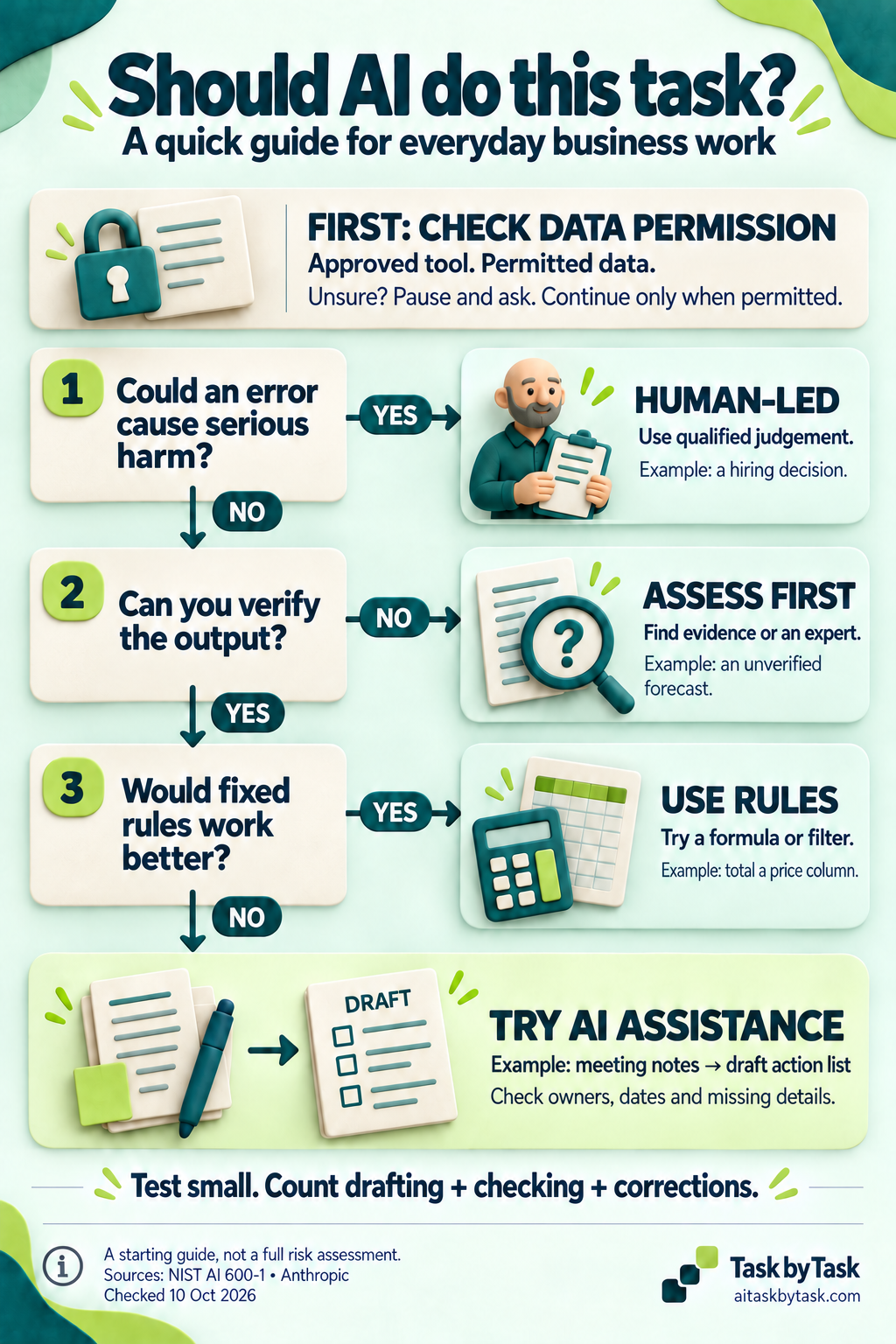
Open the original infographic (PNG, 1024 × 1536).
Text version: check the tool, data and proposed use first. If unsure, pause and ask. Keep decisions that could cause serious harm human-led. If you cannot verify the output, obtain evidence or an expert. If fixed rules fit better, use a formula or filter. Otherwise test a small supervised AI task, check owners, dates and gaps, and count drafting, checking and corrections.
Go deeper
Compare tasks that look equally automatable
These fictional decisions show why the subject alone is not enough:
- Rank job applicants for a shortlist: human-led. Errors could materially affect people. A fluent ranking and a manager’s quick glance do not establish a sound assessment. Keep selection with qualified decision-makers and the organisation’s established process.
- Predict whether a new subscription offer will succeed from two enthusiastic customer comments: assess first. The comments can support questions to investigate, but they do not establish likely demand. AI could organise the comments; a success forecast needs further evidence and an appropriate method.
- Flag renewals falling within the next 30 days in a clean account export: use rules. Define the date window, date field and treatment of missing or cancelled accounts, then test a formula or filter. AI can help draft the rule, but calculation and exception handling remain inspectable.
- Turn a checked feature brief into a first draft of a help article: try assistance. The source has a clear scope and a product specialist can check it. Test the instructions against the product itself before publishing; a checked brief may still omit a necessary step.
Reassess each task if its data, audience or consequences change. A private outline and a published customer instruction may start from the same file but need different checks.
Make the checking plan specific
Write “compare every owner and deadline with the notes”, rather than “human review”. Name the document version, reviewer and action if the check fails. If the source is incomplete, checking fidelity alone cannot establish that the underlying decision is right.
For a repeated process, include missing inputs, contradictory records, exceptions and failure to produce an answer. Consider who notices a failure and how the work returns to the manual route. If you turn the process into a diagram, keep the source rules and test its branches; the process-diagram guide shows how.
Keep a reusable decision record
Copy this record into your normal task notes or use the task kit above. Complete it yourself after reviewing any AI suggestion.
Task and intended use:
Input and current source:
Approved account, data and use:
Consequences of error:
Decision: pause for permission / human-led / assess first / fixed rules / AI assistance
Unresolved permission, if any:
Reason and supporting evidence:
Allowed supporting task:
Reviewer and exact checks:
Actions requiring separate approval:
First-test result and corrections:
Total handling effort compared with the current method:
Stop condition and manual fallback:
Revisit when:
Keep the record proportionate. For a small internal draft it can be a few lines. Revisit it when the tool, data, audience, process or consequences materially change.
Choose one recurring job from this week. Name its finish line, work through the checks and write down the next step your policy allows. The useful outcome may be a better AI brief, a spreadsheet rule or a decision to obtain more evidence first.
Sources and scope
This guide is Task by Task’s practical synthesis of the infographic, not a validated scoring system or a complete risk assessment. The examples are fictional and the example results are illustrations.
- NIST Generative Artificial Intelligence Profile supports approved-provider controls, oversight proportionate to risk, comparison with known evidence and verification of sources. Relevant action IDs are GV-6.1-007, GV-3.2-001, MP-2.3-001/003 and MS-2.5-003. The four-check order and business examples here are editorial choices.
- Anthropic’s Building effective agents recommends starting with the simplest suitable approach and adding complexity when justified. Our suggestion to consider formulas and filters applies that principle; it is not a claim that the article specifies this decision tree.
Use your organisation’s current policies and any specialist or sector-specific review the task needs. This guide does not authorise data sharing, a consequential decision or an automated action.