Choose between a chat, a saved prompt and an automation
You keep pasting the same Thursday job into a chat. A colleague wants to automate the lot. The argument will come back every quarter until somebody writes down where the task belongs and why.

What you'll make
a written decision for one recurring task (chat, saved prompt, automation or a split), with the reason, the thing that would change it and a review date. If the task needs to choose its own next steps, the same record also names the agent’s access, limits and approval points.
What you'll need
one task that genuinely repeats, its last ten instances to count, and a chat in ChatGPT, Claude, Copilot or Gemini on your work account. About 20 minutes. You don’t need an automation tool to make the decision, only to act on it.
Example result.
Task: supplier delivery queries (ops inbox)
Placement: SPLIT. Sorting and logging automated; the reply stays a saved prompt a person runs.
Reason: the sorting rule can be written down; the promise in the reply can't.
What would change this: the weekly delivery schedule becoming available to the workflow in a structured form.
Decided by: Priya Shah, 9 October 2026. Review: 9 April 2027.
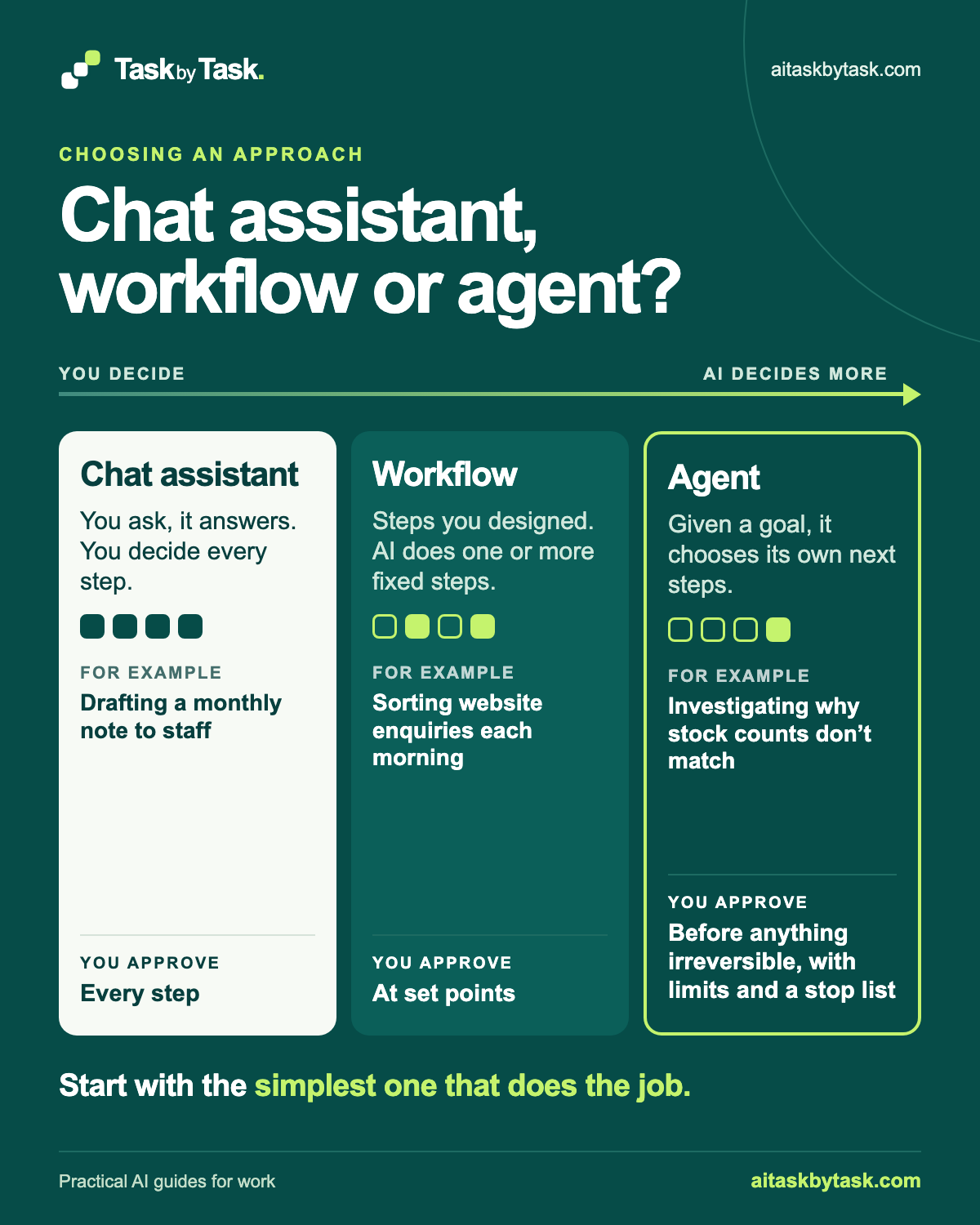
Three words get used loosely here. A chat is a person asking and reading the answer. A saved prompt is a reusable brief someone runs with fresh inputs, while the judgement stays with them. An automation is a workflow that runs when something happens, with no one opening anything. These aren’t a maturity ladder. They’re three answers to how much a task varies and how much a mistake costs.
A workflow follows steps designed in advance. An agent is given a goal and chooses its own next steps: what to look up, which tool to use and when it has finished. This distinction follows Anthropic’s engineering article. Its advice is to begin with the simplest solution that works. An agent is a trade in flexibility, cost and checking, rather than a promotion from a workflow.
Where to do this
| Tool | What to do here |
|---|---|
| ChatGPT | Paste the task description into a work chat you may use for these notes. |
| Claude | Paste the same description into your work chat. |
| Copilot | Use your organisation’s chat with information you may share there. |
| Gemini | Use your work chat with the same task and checking rules. |
The decision uses text; connecting the inbox or building a workflow comes after a tested decision.
1. Describe the task in three lines
“Weekly reporting” is a category, not a task. Write what starts it, what it produces and what someone has to decide along the way. The third line is the one people skip, and it’s the one that decides the answer.
Trigger:
Produces (and for whom):
Decides:
Frequency:
Of the last ten instances, how many followed the same shape:
If it went wrong and nobody noticed for a day:
Include an awkward recent example; it usually tells you more than three tidy ones.
Then count. Take the last ten instances and ask how many followed exactly the same shape. As a rule of thumb, seven or more means the variation is noise around a stable process. Three or fewer means there’s no process yet, only a run of judgements that look alike.
Why this works: most tasks feel variable to the person doing them, because they notice the differences. Counting replaces the feeling with a number.
What you should see: six filled lines and a count out of ten. You can describe the task without pasting confidential messages; the assistant doesn’t need a supplier’s bank details to discuss a routing rule.
2. Answer the three questions, in order
Ask them in this order, because the third can overrule the other two.
- How often, and how much does it vary? Rare and different every time points to a chat. Frequent and nearly identical points to automation. The middle is where saved prompts live.
- Can you write the rule? In a sentence, with no “it depends”. If it keeps sprouting exceptions as you write, the judgement is the work: save the context and keep the person.
- What happens if it goes wrong and nobody notices for a day? A misfiled internal note is an irritation. A wrong date in an email to a customer is a phone call you didn’t want.
Frequent, writable, low cost of failure: automate. Writable but costly to get wrong: automate the gathering and leave a person on the send. Variable and unwritable: saved prompt.
Also ask which tools or systems are involved, and what access each needs. A fixed workflow passes information along a named route. An agent may choose between several systems. Before connecting anything, check what it could read and change; the connectors guide explains that review.
Mark where a person says yes. In a chat, the person chooses what to do with each answer. In a workflow, approval sits at a point designed into the route. If an agent chooses the next steps, it still stops before sending, deleting, paying or committing. Write these as real controls, such as read-only access or a required approval step, rather than relying on instructions alone.
Why this works: it turns a debate about ambition into three answers you can check.
What you should see: your own provisional choice, which might be a split.
3. Ask the assistant to argue with you
Make your own call first. Then paste your record into a new chat with this prompt.
I'm deciding where a recurring work task belongs: a chat, a saved prompt that a person runs, an automated workflow, or a split between them. My task record is at the end.

My own answer is [your choice]. Argue the strongest case against it. Then tell me the single fact that, if it were different, would change your view. Separate what my record says from what you're assuming. Don't recommend tools or products. If the record is too vague to decide, say which line is the problem.

Task record:
[your task record]
[your choice] is chat, saved prompt, automation or split. [your task record] is the six lines from step 1.
Try arguing for the simpler route too. Could a saved prompt handle it? Could a fixed workflow cover the routine cases, with a person handling exceptions? If it can, use that. A task only reaches the agent question when the next action genuinely depends on what the last one found, and a fixed route has been tested and found insufficient.
Why this works: asking it to argue against you stops the agreeable drift where the model hands your reasoning back as agreement. The “single fact” is the condition you’ll write down in step 4.
What you should see: one case against your choice and one named fact. A balanced survey of all three options means your “Decides” line was too vague.
4. Write the decision down
Use the format of the example result: task, placement, reason, what would change this, who decided and a review date. The “what would change this” line is worth more than the decision. When someone proposes automating the whole thing in six months, you can check one condition instead of restarting the argument.
A split can cross routes: a workflow gathers delivery records, then a person uses a chat to ask questions about them. Mark the handover and check that all inputs arrive. A dropped attachment leaves the next part answering confidently about an incomplete set.
Write the condition that would move the task. Exceptions piling up may mean a workflow should move back to a person-run chat. Moving towards an agent needs evidence that the next system to examine varies, rather than enthusiasm for more autonomy. The two-week pilot guide counts drafting, checking and repairs before a change. Stopping is a valid outcome.
Why this works: a named condition and a date make the decision reviewable rather than permanent.
What you should see: five lines a colleague could read without asking you anything.
5. Set limits if the next steps genuinely vary
If the decision still points to an agent, describe what makes the path vary. A monthly stock discrepancy can arise from a missed delivery note, a returns error or a mistyped count; the next record to check depends on what the last record showed. That is a reason to test an agent, not evidence it will work.
Extend your decision record with the access and stop rules:
AGENT PART OF THE DECISION
Goal and output:
Which next steps vary, and why a fixed workflow was insufficient:
Systems it may read:
Actions it may propose:
Actions it must stop before:
Person who reviews the proposal:
Maximum run or other stopping condition:
Test cases, including the awkward one:
What would move this back to a workflow or chat:
An assistant can challenge the proposal. Use task descriptions rather than confidential records.
Help me check the simplest route for this recurring task.
Chat: a person asks, reads and decides every step.
Workflow: fixed steps with a person approving at set points.
Agent: a goal, with the model choosing the next steps within limits.

Task: [description]
Typical steps and how they vary: [steps]
Systems and access needed: [systems and permissions]
Worst realistic mistake and responsible person: [mistake and role]

Suggest a route and explain why the simpler one would or would not work.
For an agent, identify which next steps genuinely vary. List the limits,
stop rules and approval points needed. List missing information separately;
do not treat it as permission.
[description] is the one recurring job. [steps] includes the awkward case. [systems and permissions] lists the intended read or write access. [mistake and role] names the error and who owns the outcome.
Before connecting a system, attach a control to each stop rule: sending outside the organisation, changing or deleting records, spending money, committing to terms and reaching beyond the task’s data. Set the actions an agent must stop for walks through those controls. Ask the builder where the run pauses, when it gives up and how it was tested with known examples. Anthropic describes checkpoints, stopping conditions and sandboxed testing; those are checks to carry out, not assurances from a prompt.
Why this works: a varying path justifies testing extra autonomy only when the simpler route cannot do the job and the permissions limit its mistakes.
What you should see: a decision record with a reason for the route, read access, stop controls, a reviewer and test cases. If any of those is missing, resolve it before connecting the agent.
Check the result
- Your placement matches your count and your answer to the cost question.
- The record names a condition, not “when we’re ready”.
- There’s a person’s name and a real review date.
- Nothing is a policy the assistant made up; an agent proposal also has specific access, stop controls and a reviewer.
The usual failure: the assistant leans towards automation, because automation sounds like progress and its costs are invisible in a text description. Spot it when you get an enthusiastic case for automating something your count says varies, or a neat rule for an exception your team has never agreed.
You've recommended automating a task where only [count] of the last ten instances followed the same shape. Write the routing rule that would handle the others. If you can't write it in three lines without using the phrase "if needed", say so. List separately any policy you assumed that my record doesn't state.[count] is your number from step 1.
Worked example: supplier delivery queries
Fictional example. Priya, the office manager at a twelve-person kitchenware retailer, handles about fifteen supplier delivery queries a week from the shared ops inbox.
Trigger: a supplier emails the ops inbox with a delivery query.
Produces: a reply to the supplier and a row in the delivery-issues tracker.
Decides: late, short or pricing problem; whether it needs warehouse or finance;
what date to promise.
Frequency: about 15 a week.
Same shape: 8 of the last 10. (One disputed an eight-month-old credit note;
one said their warehouse contact had left.)
If wrong for a day: a supplier gets a wrong promised date.
Priya’s own answer was a split. The assistant argued for full automation, replies included: “8 of 10 is a stable process; an AI step can classify and send a standard holding reply with an expected date.”
Priya used the repair prompt with 8. The assistant wrote a sorting rule in two lines (a few phrases plus whether a quantity is mentioned), then said it couldn’t write the rule for the promised date: that depends on what the warehouse knows about that week’s schedule, which isn’t in any system. It also admitted it had assumed a “standard holding reply” that Priya’s team had never agreed.
The result is the decision record at the top of this page.
- The count (8 of 10) supported automating the sorting, not the whole job.
- The push-back exposed the part that can’t be written as a rule: the promise.
- “What would change this” came straight from the assistant’s single fact: a structured delivery schedule.
Other tasks in the same business
A. Monthly note from the managing director to staff. Different topics
   each month. Source: the director's own notes. One system: an
   work-account chat. Worst mistake: an awkward or wrong sentence the
   director would see before sending.

B. Morning sorting of website enquiries. About the same five
   categories every day. Systems: the website form and the shared
   inbox. Worst mistake: a wrong reply sent to a customer.

C. Monthly stock-discrepancy check. When the stock count and the
   sales records disagree, the cause varies: a missed delivery note,
   a returns error, a mistyped count. Systems: stock records, order
   history, delivery notes. Worst mistake: a stock record changed
   on a wrong guess.
Decisions for the same kitchenware business:
- A: Chat assistant. The topics change every month, the director is doing the thinking, and there is only one system. The director pastes notes, asks for a draft, edits it and sends it. Approval sits at every step because nothing happens without them.
- B: Workflow. The first suggestion was an agent here, although the routing path was predictable. Asking for the fixed rule exposed that mismatch, just as it did for Priya’s supplier replies. The four questions moved it left: the path is predictable (read, sort into one of five categories, draft a reply), the route between two systems is fixed, and the worst mistake is a customer-facing one. AI does two fixed steps, sorting and drafting. A person approves every reply before it is sent, and anything that fits none of the five categories goes straight to a person. The Zapier failure-rule guide shows how to build a small version of this kind of workflow with a review queue.
- C: Agent, with tight limits. The path genuinely varies: which record to check next depends on what the last one showed, and the team judged its fixed route insufficient for these cases. It tests that judgement on recent discrepancies before connecting the agent. The agent gets read-only access to the three systems and a goal: explain each discrepancy and propose a correction with its evidence. Limits: read-only; this month’s discrepancies only. Stop list: no changes to stock records, no contact with suppliers, no orders or refunds. Approval: the operations lead reviews each proposed correction and makes any change in the stock system themselves.
Notice that the agent in C does not get to finish the job. It investigates and proposes; a person changes the record. “It found the cause and then quietly fixed it” sounds efficient right up until it fixes the wrong one.
Task kit for this job: Download (ZIP) · Reusable instructions
Go deeper
When this test is the wrong tool
If the task has happened twice, you have two events, not a pattern. Do it by hand a few more times. If the “rule” is a contested policy (who gets priority, when a discount is allowed), settle it with people first: automating it hides the argument inside a workflow where the losing side can’t see it. If the task is somebody’s whole job, the conversation should involve them and shouldn’t start with a workflow diagram. And if the output touches payments, contracts or employment decisions, it needs a named person at the end, wherever AI helps in the middle. See what an agent must not finish.
The costs that don’t show up in the three questions
Someone has to own an automation. When a form changes a field name or a supplier starts emailing from a new address, the workflow fails or, worse, quietly succeeds in the wrong way. Automations without an owner degrade silently and are usually discovered by a customer. Someone also has to be told when it breaks; the default in most tools is an email to whoever built it, which stops working the day they go on holiday. For a trial, record setup, review time, corrections and failures alongside the work done.
Turn the decision into a build brief
When the decision says automate, hand the builder a brief rather than a conversation.
Turn this decision record into a build brief. Include the trigger, allowed inputs, steps, review points, duplicate handling, where failures go, who is notified and how we'll test it. Mark anything unresolved. Don't connect services or create anything.

[decision record]
The workflow owner still decides what data it may use and which actions need sign-off. For building one, see build a small Zapier AI workflow with a failure rule.
Sources
-
Anthropic: Building effective agents — workflow and agent definitions, simplicity, checkpoints, stopping conditions and testing. The count and decision method are editorial rules of thumb, not measured thresholds from this source.