Choose your first AI project from your own working week
The best first AI project is rarely the one from the conference keynote. It is usually something you did on Tuesday, and again on Thursday, and could check in a minute. Keep a one-week log, rate each task on five plain questions and you will have a shortlist drawn from your own work rather than somebody else's demo.

What you'll make
a one-week task log, a short prioritisation sheet and one small, defined test for the task that comes out on top.
What you'll need
a notebook, spreadsheet or notes app for a week, and about 20 minutes at the end of it. You can do the whole exercise without an AI tool. If you want help sorting the log, use an approved account such as ChatGPT, Claude, Gemini or Copilot, and give it task descriptions only, not the customer emails, invoices or staff details behind them.
Example result — the garden business’s first test.
Task: visit summary from the crew's job notes.
Placement: Start here — frequent, steady and easy to check.
AI drafts: the completed work and follow-up recorded in the notes.
Owner checks: each service, date and follow-up against the notes.
Owner sends: every customer summary.
Stop if: a draft adds work the crew did not do.
Review after: the first handful of checked cases.
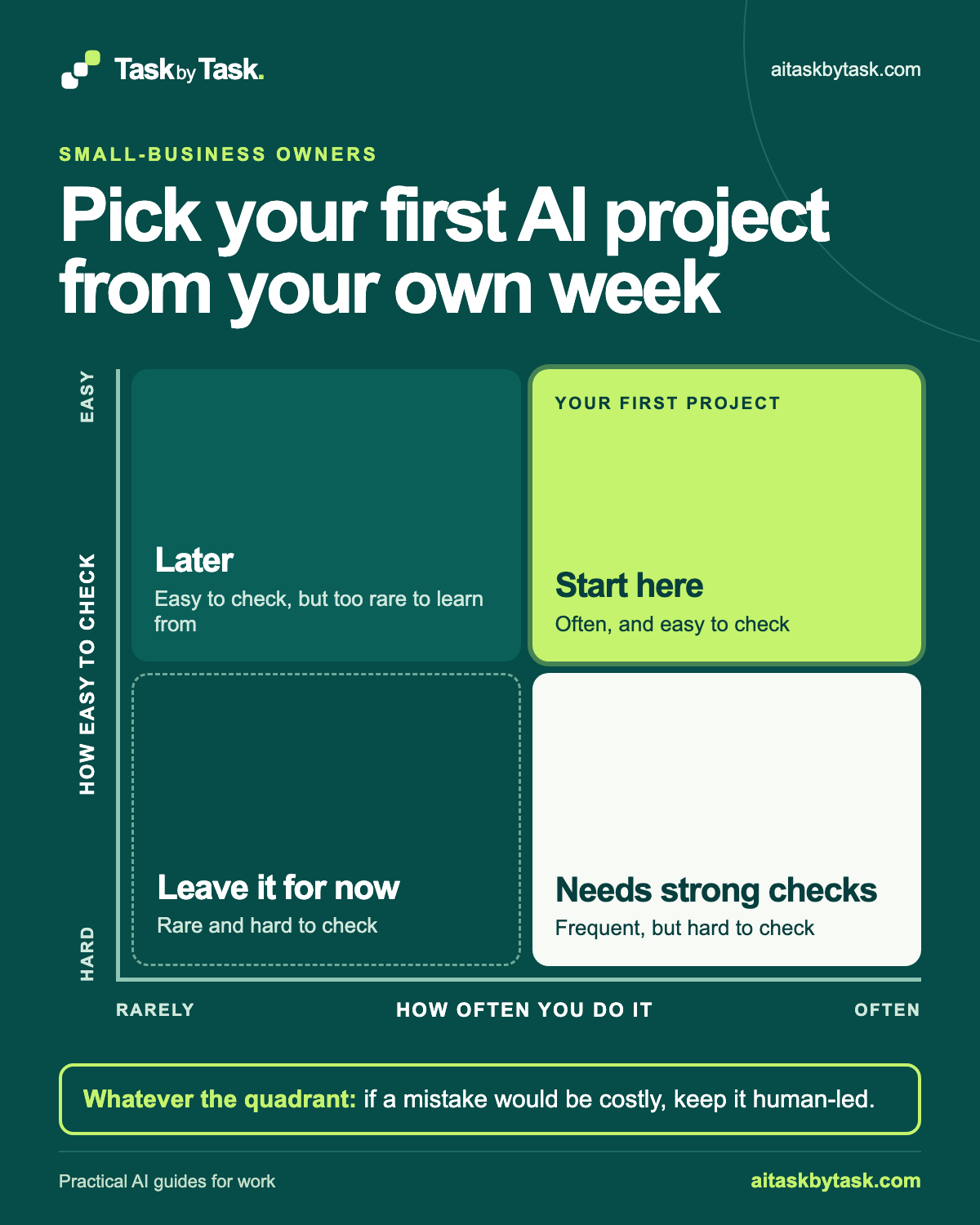
The method uses one picture. Along the bottom: how often you do it, from rarely to often. Up the side: how easy it is to check, from hard to easy. That gives four quadrants:
- Start here: often, and easy to check
- Later: rarely, but easy to check
- Needs strong checks: often, but hard to check
- Leave it for now: rarely, and hard to check
One rule sits outside the grid. High-consequence tasks stay human-led whatever the quadrant. A task can be frequent and simple to check and still be the wrong place to begin, if a mistake would cost a customer money or commit you to something.
Where to do this
| Tool | How to use this text method |
|---|---|
| ChatGPT | Paste task descriptions and your ratings into a chat. |
| Claude | Paste task descriptions and your ratings into a chat. |
| Copilot | Paste task descriptions and your ratings into a chat. |
| Gemini | Paste task descriptions and your ratings into a chat. |
1. Keep a one-week task log
For one ordinary week, jot down each task when you finish it. Skip the two-minute replies; you are looking for jobs that come round again.
WEEKLY TASK LOG — week starting [date]
Repeat this entry for each finished task:

Day:
Task, in plain words:
What it produced:
How long it felt: short / medium / long
Notes:
Describe the task, not the content: “wrote a visit summary for a customer”, without the customer’s name. The “what it produced” column matters: a task ending in a draft, list or table is easier to test than one ending in “sorted it out”.
“How long it felt” is deliberately rough. You are ranking candidates, not timing them.
At the end of the week, merge repeats. Five visit summaries become one task, done five times.
Why this works: Logging completed jobs gives you repeated work rather than a list of impressive demos.
What you should see: A week of task descriptions and outputs, with repeats merged.
2. Rate each task on five criteria
Copy each distinct task into the prioritisation sheet and rate it low, medium or high on five questions. Rough is fine; honest matters more.
PRIORITISATION SHEET

Repeat one record per distinct task:

Task:
Frequency: low / medium / high
Time it takes: low / medium / high
Repeatability: low / medium / high
Ease of checking: low / medium / high
Consequence of an error: low / medium / high
Quadrant:
Notes:- Frequency: how often it came up in the week. Daily is high; once a quarter is low.
- Time it takes: your rough sense from the log. A frequent task that takes moments may not be worth changing.
- Repeatability: whether it follows much the same shape each time. A standard reply is highly repeatable; a negotiation is not.
- Ease of checking: whether you could tell, quickly and reliably, if a draft was wrong. You need a source to compare it with: your notes, a price list, a booking. If the only check is “it sounds right”, rate it low.
- Consequence of an error: what happens if a mistake gets through. Low is an internal note you would correct later. High is money, a commitment to a customer, anything about an employee, or personal data going somewhere it shouldn’t.
Don’t add the five ratings into a score. A high consequence rating is not cancelled out by four friendly ones. Treat it as a gate: if a mistake would be serious, the task stays human-led, and AI can help only with a narrow part a person then checks. The when not to use AI guide covers that narrowing move in more detail.
Why this works: Keeping consequence separate stops frequent tasks outranking a serious risk.
What you should see: Five qualitative ratings for each task, without an averaged score.
3. Place each task on the matrix
Use frequency and ease of checking to choose the quadrant. Time and repeatability then break ties within a quadrant: of two Start here tasks, try the one that takes longer and follows a steadier pattern.
- Start here tasks are your first-project shortlist.
- Later tasks are fine candidates, but rare tasks give few chances to test. Return to them once a frequent task works.
- Needs strong checks tasks may still be worth doing, but only with a defined check on every output. The checking-level guide helps you choose one.
- Leave it for now tasks would make a slow, unreliable trial. Note them and move on.
Then apply the side note. Mark any high-consequence task as human-led, wherever it landed.
Why this works: Frequency and checking determine the quadrant; time and repeatability break ties.
What you should see: A shortlist with high-consequence work marked human-led.
4. Ask AI to help sort the list, if you want
Sorting twenty lines by hand is manageable, but an approved assistant can do it and point out ratings you skipped. Paste task descriptions only.
Below is my prioritisation sheet from one working week. Each task is
rated low, medium or high on frequency, time it takes, repeatability,
ease of checking and consequence of an error.

Place each task in one quadrant using frequency and ease of checking:
- Start here: frequency high, ease of checking high
- Later: frequency low, ease of checking high
- Needs strong checks: frequency high, ease of checking low
- Leave it for now: frequency low, ease of checking low
Treat medium ratings as uncertain and say which way you leaned and why.

Mark any task with a high consequence rating as "human-led" regardless
of quadrant. Do not average or combine ratings into a score.
Within each quadrant, order tasks by time it takes, then repeatability.
List any task with a missing rating separately instead of guessing it.
Do not estimate time or money saved.

Return a table: task, quadrant, human-led yes/no, one-line reason.

[Paste your sheet]
Replace [Paste your sheet] with the corresponding detail or notes from your own task.
Naming the quadrant rules makes the tool apply yours, not its own idea of a good AI task. Medium ratings and missing values get explicit instructions because that is where a tidy table tends to guess.
Check the result against your sheet. Every high-consequence task should say “human-led”. No task should have moved quadrant without a reason you agree with. If the answer has quietly become a list of projected savings, it has answered a different question.
Use the repair in the final check below if the sorter changes your consequence rating or invents savings.
You decide the final placement. The assistant only sorted the sheet; it does not know your customers.
Why this works: Explicit placement rules keep the sorter applying your criteria.
What you should see: A sorted sheet with uncertainty and missing ratings left visible.
5. Pick one task and define a small test
Choose one Start here task that is not human-led. Write down what AI will do, what you will still do and how you will know whether it worked.
FIRST AI PROJECT — SMALL TEST

TASK:
QUADRANT AND WHY:
APPROVED TOOL AND ACCOUNT:
WHAT I MAY GIVE IT (and what I won't):
WHAT AI DRAFTS:
WHAT I CHECK, AGAINST WHICH SOURCE:
WHAT A PERSON STILL DECIDES OR SENDS:
NUMBER OF REAL CASES TO TRY:
WHAT WOULD MAKE ME STOP:
DATE TO REVIEW:
Keep the test small: a handful of real cases, each checked. Answer “what would make me stop” before you start, for example “if I’m rewriting most of each draft”. If you’re unsure whether the task suits an ordinary chat, a saved prompt or an automation, the chat, template or automation guide helps you decide before you build anything.
Why this works: A small test with a source check can show whether the task is worth continuing.
What you should see: One defined trial with a human send, stopping condition and review point.
Check the result
- Frequency and ease of checking explain the chosen quadrant.
- Every high-consequence task still says human-led.
- Missing or medium ratings remain visible; no invented saving appears.
- The first test names a source check, a person and a stopping condition.
The usual failure: the sorter drops the human-led mark or replaces your rough ratings with invented time estimates. Compare each row with your sheet.
Your table removed the human-led mark from [task] and added time
estimates. Use my consequence rating exactly as given and mark every
high-consequence task as human-led. Remove all time or savings
estimates. Keep the rest of the table unchanged.
[task] is the task whose consequence rating the sorter changed.
Worked example: three tasks, three quadrants
Fictional example. The owner of a four-person garden maintenance business logged a week. Three tasks show how differently they land.
A. Visit summaries for customers after each job.
   Frequency: high. Time: medium. Repeatability: high.
   Ease of checking: high (compare with the crew's job notes).
   Consequence of an error: low to medium (customer-facing, but
   describes completed work).

B. Replies to new enquiries, including rough availability and scope.
   Frequency: high. Time: medium. Repeatability: medium.
   Ease of checking: low (availability changes; scope is a judgement).
   Consequence of an error: high (could commit to a date or price).

C. Comparing the annual van insurance renewal options.
   Frequency: low. Time: high. Repeatability: low.
   Ease of checking: low (policy terms need careful reading).
   Consequence of an error: high (cover and money).
Illustrative placement:
- A lands in Start here. It is frequent, steady in shape and has an obvious source to check against. The consequence is not high, so it becomes the first project. The owner still compares each summary with the job notes and sends it personally.
- B lands in Needs strong checks, and it is human-led. It comes up often, which makes it tempting. But a draft could promise a Tuesday the crew doesn’t have, and the high consequence rating keeps the owner in charge of every reply. A narrower use might be drafting the polite opening and questions, while the owner writes availability and price.
- C lands in Leave it for now, and it is human-led. Once a year, hard to check and high consequence. Comparing insurance cover stays with the owner and, where needed, a qualified adviser.
None of the three lands in Later. Any rare, easy-to-check tasks in the log wait until the first project is working.
The small test for task A reads: draft a summary from the crew’s notes for each of the next several jobs; check every service, date and follow-up against the notes; stop if summaries add work that wasn’t done. In an illustrative first sort, the assistant also marked the enquiry replies as Start here and omitted their human-led mark. The owner used the final-check repair with “enquiry replies”; the corrected record put them back in Needs strong checks, human-led. Nothing here claims the drafts will be faster. The test exists to find out.
Go deeper
You can stop once your small test is written. These lessons help when the first pass is unclear or you want to repeat it.
When nothing lands in Start here
An empty top-right corner is a useful finding, not a failure. Look first at Needs strong checks: can you make a task easier to check? Often the answer is a better source. A visit summary is hard to check if the job notes are a few words on a scrap of paper; it becomes easier if the crew records the same few fields each time.
Then look at Later. A rare task with a clear check is a slower but safe place to learn. If neither helps, keep doing the work as you are. The should AI do this task guide walks through simpler alternatives, including a checklist or template with no AI at all.
Re-rate after the first test
Your ratings were a forecast. After a few real cases, revisit them. Ease of checking often moves: a fluent draft can make a subtle error harder to spot than you expected.
Update the sheet, move the task if needed and record why. If the task held up, the two-week pilot guide shows how to count the whole job before deciding to keep it.
Run the log with a small team
Ask each person to keep their own one-week log, then rate tasks together. Disagreement is informative: colleagues who rate ease of checking differently may be checking against different sources.
Keep the consequence rating with whoever owns the risk. Anything involving pay, performance, complaints or other employee matters stays outside this exercise and with the responsible person. If you’re new to choosing and briefing a first task, start with Start here with AI at work.
Sources
The log, qualitative ratings and matrix are an editorial method. They do not measure or predict savings; the small test is how you find out whether the task helps.