Give your team portraits a consistent style
Try one consistent team-portrait treatment before editing a whole directory.



Actual synthetic image edits made on 4 October 2026 with the available image-generation tool. Model version unavailable. These are not ChatGPT interface tests, real-person likeness tests or a multi-person team benchmark. Requested 1024 × 1024; actual files 1254 × 1254.
A team page can look more consistent when the portraits share a background and crop. You can try that treatment on one photo before asking everyone to join the exercise.
What you'll make
one style sample to review for a team directory.
What you'll need
an approved image-editing account and permission from the adult pictured. Use the fictional source here for practice. For a real team, each person should approve their own result and be free to reject it.
1. Choose a shared treatment
Start with the bright directory style below. The other options are charcoal and a restrained office background.
Agree the background, square shape, headroom and eye height. Keep each person’s age, face, clothes and identifying details as photographed. You are arranging a directory, not conducting an audition.
2. Upload one original photo
Use the untouched source in ChatGPT. Adapt the fictional-demo labels and subject description in the prompt for your own permitted photo; keep its appearance-preservation constraints. The percentage positions are targets to check, not a guarantee of exact alignment.
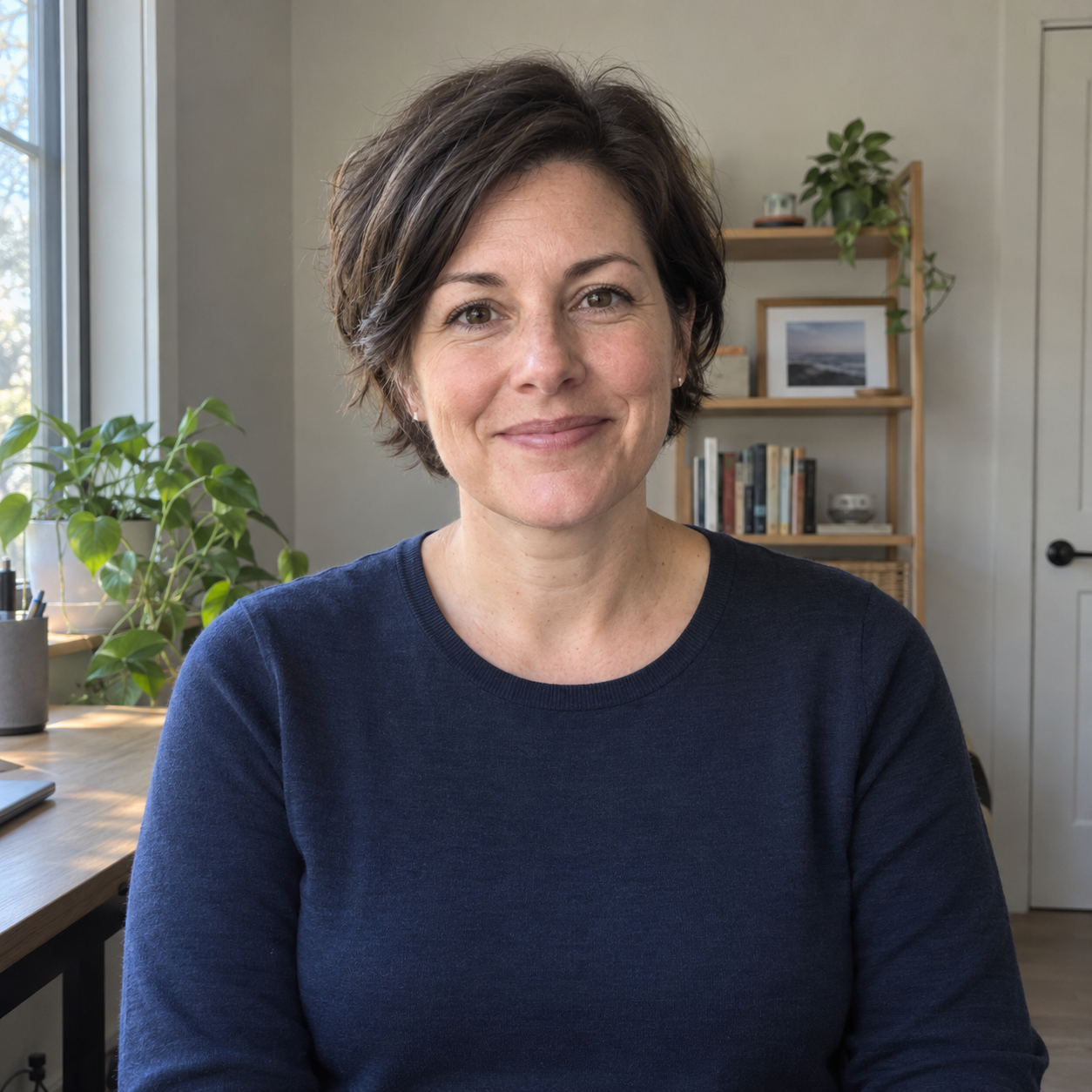
The AI-generated starting portrait. Every displayed edit began from this original.
3. Try the bright directory style
Actual generated output; fictional adult. Original PNG retained without retouching.
The pale-mint background is visible. The eye position and headroom do not exactly meet the requested percentages, and the background colour has not been measured against the target hex value.
Exact prompt used for this image:
Use case: identity-preserve.
Asset type: synthetic portrait example for a TaskbyTask headshot-style article.
Edit target: the attached original reference image, a fictional adult woman about 40 with short dark-brown hair, brown eyes, a navy crewneck top, small stud earrings, and a closed-mouth smile.
Preserve the reference subject's facial proportions, apparent age, eye colour, natural fine lines and skin texture, hair shape and colour, earrings, navy crewneck clothing, and closed-mouth smile. Preserve her natural body proportions. Do not beautify, slim, smooth skin, apply makeup, invent physical features, change the outfit, or add career claims, credentials, logos, text, badges, or watermarks. Only make the declared background, lighting, and framing changes below.
Declared style: a consistent team-directory portrait on a plain pale mint background, target colour #E5EFEA, with even soft light. Precisely centred, straight-on head-and-shoulders square framing: midpoint between the eyes on the vertical centreline, eyes approximately 40 percent from the top, top of the hair approximately 10 percent from the top, and shoulders filling the lower frame. Maintain the original natural pose and expression as closely as this crop permits. No props or other additions.
Output: one 1024 by 1024 pixel square PNG portrait, if supported. Opaque background. Produce only this one image.
4. Check before doing more
Compare the face, apparent age, hair, clothing and accessories with the original. Ask the person pictured to approve the likeness. Then preview the square on the actual team page: check head size, eye height, spacing and background.
A style prompt can still alter the person or miss the crop. Reject an unsuitable result; if the source photo is poor, ask for a better photo rather than inventing missing details.
These examples use one fictional subject. They do not show consistency across a real team.
Optional style: Charcoal directory
The navy top remains visible against the dark backdrop. The crop and facial details differ from the bright version; matching instructions did not make the images pixel-aligned.
Actual generated output; fictional adult. Original PNG retained without retouching.
Exact prompt used for this image:
Use case: identity-preserve.
Asset type: synthetic portrait example for a TaskbyTask headshot-style article.
Edit target: the attached original reference image, a fictional adult woman about 40 with short dark-brown hair, brown eyes, a navy crewneck top, small stud earrings, and a closed-mouth smile.
Preserve the reference subject's facial proportions, apparent age, eye colour, natural fine lines and skin texture, hair shape and colour, earrings, navy crewneck clothing, and closed-mouth smile. Preserve her natural body proportions. Do not beautify, slim, smooth skin, apply makeup, invent physical features, change the outfit, or add career claims, credentials, logos, text, badges, or watermarks. Only make the declared background, lighting, and framing changes below.
Declared style: a consistent team-directory portrait on a plain charcoal background, target colour #343A3B, with soft frontal light. Precisely centred, straight-on head-and-shoulders square framing: midpoint between the eyes on the vertical centreline, eyes approximately 40 percent from the top, top of the hair approximately 10 percent from the top, and shoulders filling the lower frame. Maintain the original natural pose and expression as closely as this crop permits. No props or other additions.
Output: one 1024 by 1024 pixel square PNG portrait, if supported. Opaque background. Produce only this one image.
Optional style: Restrained office
This result includes a plant and support surface, plus a closer crop. The setting is invented. Use genuine workplace photographs if the page implies the location is real.
Actual generated output; fictional adult. Original PNG retained without retouching.
Exact prompt used for this image:
Use case: identity-preserve.
Asset type: synthetic portrait example for a TaskbyTask headshot-style article.
Edit target: the attached original reference image, a fictional adult woman about 40 with short dark-brown hair, brown eyes, a navy crewneck top, small stud earrings, and a closed-mouth smile.
Preserve the reference subject's facial proportions, apparent age, eye colour, natural fine lines and skin texture, hair shape and colour, earrings, navy crewneck clothing, and closed-mouth smile. Preserve her natural body proportions. Do not beautify, slim, smooth skin, apply makeup, invent physical features, change the outfit, or add career claims, credentials, logos, text, badges, or watermarks. Only make the declared background, lighting, and framing changes below.
Declared style: a consistent team-directory portrait against a softly defocused modest office wall and one small plant, with consistent neutral daylight. No other background objects, logos, documents, credentials, or career claims. Precisely centred, straight-on head-and-shoulders square framing: midpoint between the eyes on the vertical centreline, eyes approximately 40 percent from the top, top of the hair approximately 10 percent from the top, and shoulders filling the lower frame. Maintain the original natural pose and expression as closely as this crop permits. No other additions.
Output: one 1024 by 1024 pixel square PNG portrait, if supported. Opaque background. Produce only this one image.
Go deeper
You can stop after the checked result above. Open a lesson below for the fuller method, refinements and checks. These extend the first task; they are not prerequisites.
Optional training: Pilot the specification with real team photos
Choose the style, then trial it with a small set of permitted real source photographs before processing the rest. Include the kinds of source variation actually present: different lighting, glasses, hairstyles and framing. Compare whether the specification works across them; do not rank the people by how well they suit it.
Ask each person to check their likeness, apparent age, hair, clothing and accessories against their original. Ask the page owner to check crop, head size, background tone and spacing in the actual directory. Keep a rejected output as a rejected output, rather than silently changing the rules until it looks acceptable.
If a source is too poor, request a new photograph under a simple capture brief. Do not ask the tool to recover an obscured face or invent missing details. Repeating the same prompt cannot make every source equally suitable.
Optional training: Keep a useful approval and production record
For each approved portrait, retain the source, exact prompt, tool and date, output file, actual dimensions and approval. Store photographs according to your organisation’s rules, with access limited to the people doing the work. The data controls available in an account do not replace those rules.
An approval record tells colleagues which image is current and makes the next addition easier. It also beats a folder containing twelve files called final-final.
All three samples returned 1254 by 1254 pixels, despite the 1024-pixel request. Exact framing, colour and consistency across different people remain unproven.
If the directory only needs one profile image today, the LinkedIn style comparison is the smaller job.
About these examples
These are actual edits of one fictional adult, generated on 4 October 2026 with the available image-generation tool, not in the ChatGPT interface. The model version was not exposed. They are not a real-person likeness or repeatability test. The examples show styles from this run, not proof of trust, sales or other business results.
All three outputs are 1254 × 1254 pixels, despite the 1024-pixel request. Framing, colour, facial detail and fabric still need checking. The unchanged image record contains the exact prompts, dates, dimensions, hashes and inspection notes.