Compare supplier prices with different units and commitments
One supplier quotes £18 per user per month, the other £240 per ten-seat pack per year. Before anyone says which is cheaper, someone has to work out what each price actually buys.
Example output
A comparison workbook you can check
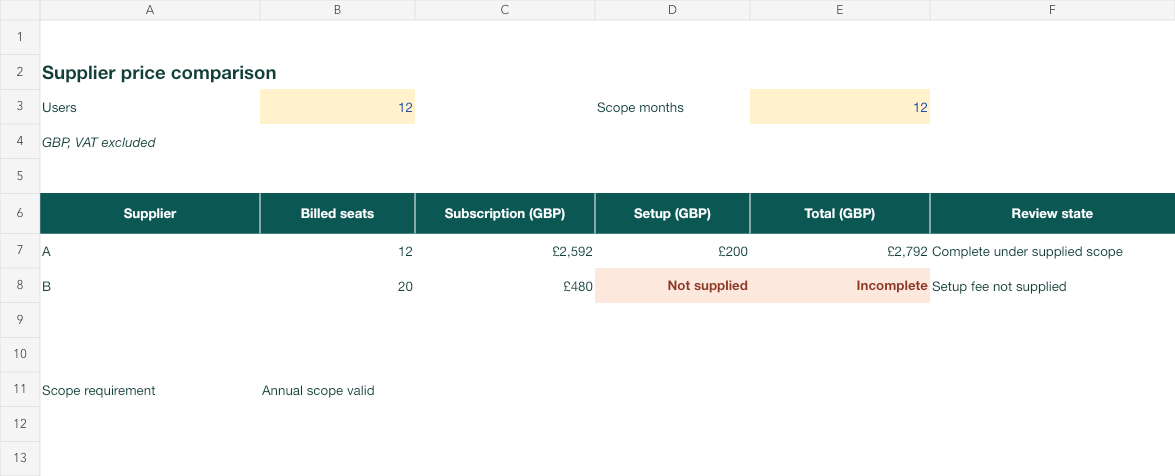
Fictional comparison workbook: different billing units stay visible, and B's unknown setup fee keeps its total incomplete.
Read the prompt
Compare these supplied quotes for [quantity/users] over [period].
Preserve each price unit, billing cadence, minimum paid quantity,
commitment, setup fee, currency and tax/exclusion wording.
Show the normalisation steps, billed quantity and known components.
Keep a missing fee as unknown and a total requiring it incomplete.
Do not rank complete costs when a required component is missing.
Ask focused questions for incompatible units or an unagreed scope.
Provide the source-linked table and actual calculation file if supported.What you'll make
a like-for-like cost table for your real quantity and period, with billed units, minimums and any missing fee shown, not guessed.
What you'll need
the quotes you are allowed to share with your work AI account (ChatGPT, Claude or Gemini), the number of users or units, the period you are comparing and whether prices include VAT. About 15 minutes.
1. State the scope, then hand over the quotes
Before the AI sees a single price, decide how many users or units you need, for how long, and whether that number will change. Then paste or upload each quote with its price unit, minimum paid quantity, commitment, one-off fees and exclusions.
If the quotes use different currencies or tax bases, decide the convention yourself first. Don’t let the AI pick an exchange rate or assume a missing fee is zero.
Compare these quotes for [quantity] users over [period].
Keep each quote's price unit, billing frequency, minimum paid quantity,
commitment, setup fee, currency and VAT wording exactly as written.
Show how you converted each one: billed quantity, period, recurring subtotal and one-off fees.
If a fee is missing, mark it unknown and mark any total that needs it as incomplete.
Don't rank options on totals that are incomplete. Ask me about any unit you can't convert.
[quantity] and [period] are your scope, such as “12” and “the first 12 months”.
Why this works: “£18” and “£240” share no denominator until you fix the quantity and period. Naming every factor stops the AI from dropping the one that changes the answer.
What you should see: one row per quote with the source rate, the billed quantity after minimums, the period conversion and a total marked complete or incomplete.
2. Ask for the working, line by line
A per-user monthly price needs paid users × months. A pack price needs whole paid packs, not fractions. Minimums can make billed seats exceed the people who will use them. Ask for those steps instead of one unexplained total, and keep one-off and recurring costs apart until the period is fixed.
For each quote, show: source rate and unit, paid quantity after minimums and pack rounding,
months or years counted, recurring subtotal, one-off fees, and total status (complete or incomplete).
Don't prorate a commitment or round a pack down. Tell me whether each £0 fee is stated in the quote or just missing.
Why this works: each line is a number you can recalculate on a phone in seconds, so a wrong step shows up before it reaches the total.
What you should see: a short calculation for each quote that you can follow from source rate to total.
3. Find the break-even when a fee is missing
If one option’s total is incomplete, don’t stop at “incomplete”. Work out how big the missing fee would have to be to change the answer. That tells you whether the gap matters and gives you one precise question for the supplier.
Quote [incomplete option] is missing [missing fee]. Using only the known figures,
how large would that fee have to be before this option costs more than the cheapest complete option?
Show the subtraction, then write one short question I can send the supplier.
[incomplete option] is the quote with the gap; [missing fee] is the fee it doesn’t state.
Why this works: “We don’t know B’s setup fee” is a shrug. “B is cheaper unless its setup fee is over £2,312” is a decision you can close with one email.
What you should see: a single break-even figure and a one-line supplier question.
Check the result
- Recalculate one recurring subtotal yourself: rate × billed quantity × periods.
- Check pack rounding: 12 users on 10-seat packs is two packs, never 1.2.
- Check that every fee in the table appears in a quote, and every £0 is stated, not assumed.
- If the AI built a workbook, open it, change the quantity and confirm the totals move.
The usual failure: the AI treats a missing fee as £0, calls the total complete and declares a winner. Spot it by looking for a “Total” with no “incomplete” flag on an option whose quote never mentions that fee.
Quote [option] does not state a [fee name], but your table treats it as £0 and ranks it cheapest.
Mark that fee unknown, mark the total incomplete, remove the ranking,
and give the break-even fee above which the cheaper option stops being cheaper.
[option] and [fee name] are the quote and fee you spotted.
Worked example: twelve users for twelve months
Fictional example. Supplier B looks six times cheaper. It might be. It depends on a fee nobody has quoted yet.
Scope: 12 users, 12 months, GBP, prices exclude VAT
Quote A: £18 per user per month, minimum 10 users, setup fee £200
Quote B: £240 per 10-seat pack per year, minimum 2 packs, setup fee not stated
First answer (wrong): “B costs £480 for the year and A costs £2,792. B is the cheapest option.”
Repair: the repair prompt above, with [option] as B and [fee name] as setup fee.
Repaired answer:
| Quote A | Quote B | |
|---|---|---|
| Billed quantity | 12 seats (above the minimum of 10) | 2 packs = 20 seats |
| Subscription | 12 × £18 × 12 = £2,592 | 2 × £240 = £480 |
| Setup | £200 (stated) | Unknown |
| First-year total | £2,792, complete | £480 + setup, incomplete |
B is cheaper unless its setup fee is above £2,312 (£2,792 − £480). Ask the supplier for it before deciding.
- The first answer was right about the sums and wrong about the conclusion: B’s setup fee was missing, not zero.
- B bills 20 seats for 12 people. That’s the minimum doing its job, and worth knowing if headcount grows to 21, which needs a third pack.
- The break-even turns “incomplete” into a single question for supplier B.
Try it
Change the headcount and watch the billed seats
Normalise only agreed units and retain billing, quantities and missing fees.
Convert both quotes to billed seats for the same period. B's known subscription is lower, but its first-year total stays incomplete until its setup fee is known.
The example in text
- A: £18/user/month, min 10, £200 setup
- B: £240/10-seat pack/year, min 2 packs
- B setup unavailable
Task kit for this job: Download (ZIP) · Reusable instructions
Go deeper
Model quantities that change over time
If you expect 12 users now and 18 from month seven, give the AI the schedule and each quote’s rules for adding and removing seats. Don’t let it assume free reductions, prorating or refunds; ask it to list which rule from each quote it used for each change. The conflicting-unit guide shows when to ask a question before doing arithmetic.
Keep non-price differences in their own table
Features, support terms and implementation effort may matter more than £300 a year. Put them in a separate table with the evidence for each line, rather than turning them into invented scores that make a price comparison look like a complete buying decision.
Save the method, not the numbers
The scope, conversion and missing-fee rules work for every new set of quotes. Save the step 1 and step 2 prompts, and paste fresh quotes and scope each time so last year’s fee doesn’t sneak into this year’s table. See repeatable spreadsheet questions.