Save useful spreadsheet questions without saving stale business facts
You ask the same three questions of the expenses export every month. Save the questions, not October's answers, or October's total will turn up in November's summary looking every bit as confident as it did the first time.
Example output
A reusable period-analysis workbook
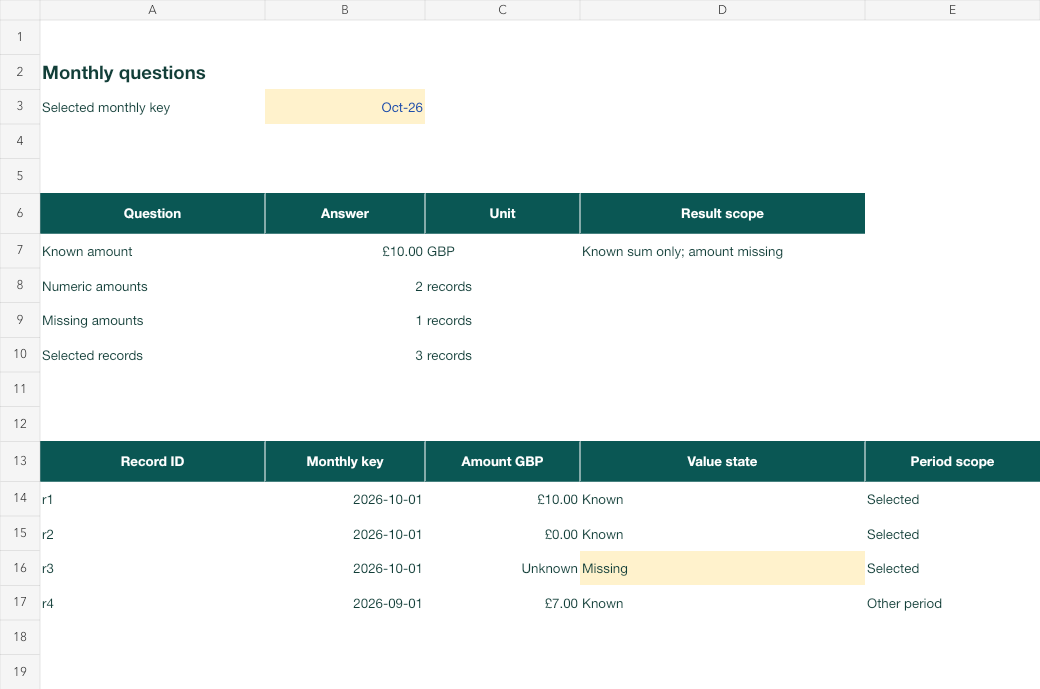
Example workbook: the selected month and the missing amount stay visible.
What you'll make
a saved spreadsheet question you can reuse every month, and a quick check that each answer came from this month’s file.
What you'll need
a recurring export you’re allowed to use with AI, the question you ask of it each month, ChatGPT, Claude, Copilot or Gemini in your work account, and about 15 minutes the first time.
1. Write the question once, without this month’s facts
Write the question the way you’d ask a colleague, then add the rules that stop old answers leaking in.
For the month I name, answer: [question]. Amounts are in [unit].
Treat a blank amount as unknown, not zero, and count blanks separately.
If no rows match the month, say "no records", not £0.
Use only the file attached in this chat. Do not reuse totals, dates or
answers from earlier chats, saved notes or examples. If I haven't
attached a file or named a month, ask for both first. Show which rows
you used for each number.
[question] is your monthly question, such as “total the known amounts”; [unit] is the currency or unit in the file.
Why this works: the prompt describes how to answer, not what the answer was. Nothing in it is true only for October.
What you should see: a question you could paste in any month without editing anything but the month name.
2. Save it where you’ll find it next month
| Tool | Where the saved question lives |
|---|---|
| Claude | Projects › + New Project, then Set project instructions › Save instructions. See Claude Projects. |
| ChatGPT | Open a project, then ⋯ › Project settings and add it as instructions |
| Copilot or Gemini | Keep it in a note or Word document and paste it at the start of each chat |
Keep example figures out of the saved text. If you want an example, put it under a heading that says Example only, so a future run can’t mistake it for current evidence. For a routine with several questions, ask the assistant to split it:
Turn these monthly questions into reusable instructions with two parts.
Stable rules: the questions, units, how to treat blanks and empty months,
and when to stop and ask. Fresh inputs: a short form for the month, the
file name and anything that changed this time. Put any sample figures
under "Example only". Then add a three-line run record: file, month,
answer and checks done.
Why this works: the stable part never changes; the fresh part is the only place a month or figure can come from.
What you should see: instructions with no real dates or totals, plus a short form you fill in each month.
3. Each month, attach the new export and name the month
Start a new chat in the project (or paste the saved question), attach this month’s file and write one line: “Run the saved questions for November 2026.”
Why this works: a new chat with a new file gives the model nothing from last month to borrow except the method.
What you should see: the month, the rows used, each answer and the count of blanks, in that order.
Check the result
- The month in the answer matches the month you asked for and the dates in the file.
- Open the file and find two of the rows the answer used. Do the amounts match?
- The blank count matches what you can see in the file.
- No figure appears that you can’t find in this month’s file.
The usual failure: last month’s answer comes back. A month with no rows gets October’s total, or a confident £0. Spot it by searching the file for each number in the answer.
Your answer uses [figure], which is not in this month's file. Remove it
and answer again from the attached file only, showing the rows behind
each number. If no rows match [month], say "no records" rather than £0.
Tell me if [figure] came from my saved instructions or an example.
[figure] is the number you couldn’t find; [month] is the month you asked about. If the figure came from your saved instructions, delete it there too, or move it under Example only.
Worked example: November isn’t October
Fictional example. Tomasz runs a monthly check on a small expenses export. This is the file:
Record  Month     Amount (GBP)
r1      2026-10   10
r2      2026-10   0
r3      2026-10   (blank)
r4      2026-09   7
The saved question, asked for each month, should give:
| Month | Saved question’s answer |
|---|---|
| September | £7 known (r4); no blanks |
| October | £10 known from r1 and r2 (the £0 is a real zero); r3 blank, counted separately |
| November | No records, not £0 |
His first November run said: “November 2026: known total £10, 1 amount missing.”
- The failure. There are no November rows at all. The answer is October’s, word for word. Tomasz’s saved instructions included the line “e.g. October total £10” with no label, and the model treated it as a fact.
- The repair. The repair prompt, with £10 and November, gave: “No records for November 2026 in this file. The £10 came from the example in your instructions.” He moved the example under Example only.
- The check that caught it. Searching the file for “10” found only an October row.
Task kit for this job: Download (ZIP) · Reusable instructions
Go deeper
Check a new export before reusing the question
If a column is renamed, a unit changes or the file switches from one row per month to one row per day, the saved question may quietly answer the wrong thing. A matching filename isn’t enough. Before the first run on a changed export, ask: “List the columns, their units and the date range in this file, and say whether each date is a day or a month.” Then update the saved question and your data dictionary.
Keep a small file with known answers
Keep a tiny test file with one clear amount, one real zero, one blank and one row from another month, like Tomasz’s. When you change the saved question, run it on that file first. If the answer isn’t the one you already know, the routine changed, not the data. The known-answer guide explains why these cases catch more than a normal month.
Version the rules and keep a run record
When you change a saved rule, give it a new version number and a line on why. Record the file, month, rule version, answer and checks for each run. Reuse the method next month, never the record’s figures. The run-record guide has a template.