Use a known-answer dataset to inspect an AI analysis method
A plausible total is a weak test. Give AI a tiny dataset where you already know the answer, including the awkward rows.
Example output
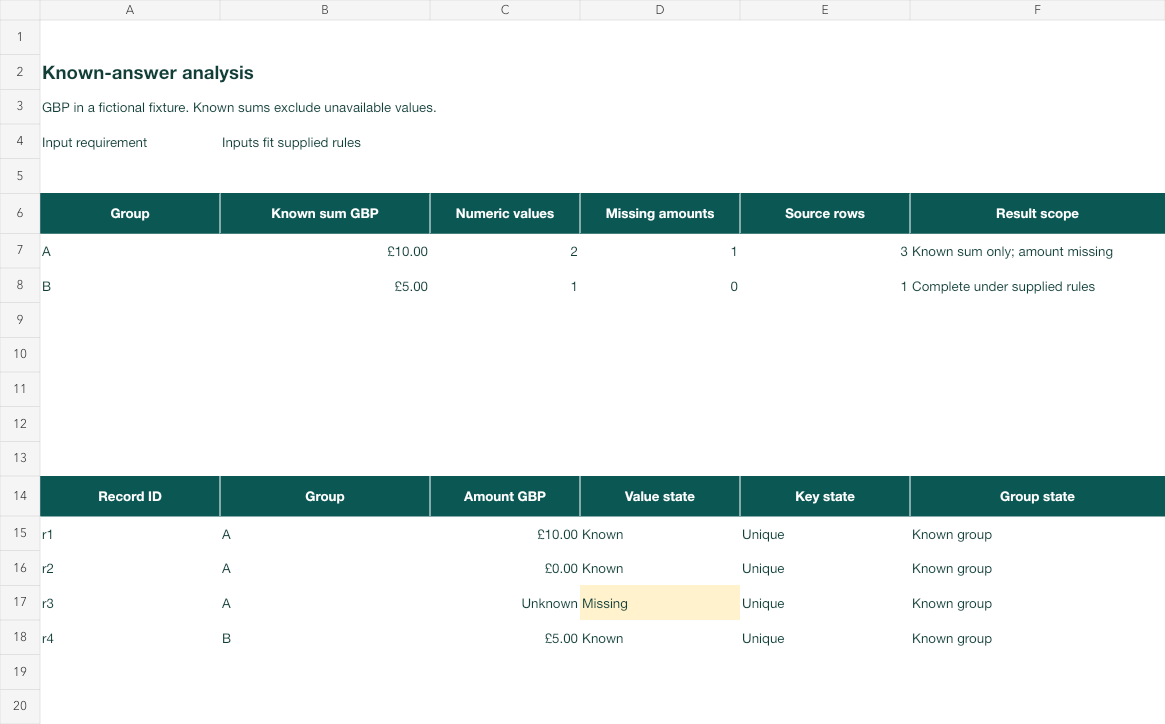
An independently checked answer sheet
Actual rendered fictional workbook with known subtotal, zero and unavailable states kept separate.
Read the prompt
Analyse this small control file before applying the method to my larger file.
Group by the supplied category. Preserve unique record IDs.
Report the known subtotal, numeric count and unavailable count separately.
A blank amount is unknown; an explicit zero is a known number.
Show which source rows contribute to each answer. Stop if a record ID
is duplicated or missing, a group is outside the supplied set, or an
amount contains invalid text. Return the calculation method and actual file.What you'll make
a four-row test file with answers you’ve worked out yourself, and a short record of how the AI method handled it and each awkward change.
What you'll need
the calculation you want AI to do for you regularly, such as totals by category, and a tool that can read a file: ChatGPT or Claude with an upload, Copilot in Excel or Gemini in Sheets (Ask Gemini, top right). Allow about 20 minutes. To practise, download the known-answer workbook.
1. Write four rows and the answers first
This is worth doing before you rely on a calculation you’ll repeat, such as a monthly sales summary or a pricing sheet. For a one-off question, ask and spot-check a few rows instead.
Make a tiny file with the same columns as your real one. Include a normal value, a genuine zero, a blank amount and a second group, and give each row a unique ID:
ID, Group, Amount (GBP)
r1, A, 10
r2, A, 0
r3, A,
r4, B, 5
Then write down the right answers yourself, before any AI sees the file. Here, group A has a known subtotal of £10 from two numeric rows and one blank, so A’s full total is unknown. Group B is £5 from one row.
Why this works: each awkward row catches a different mistake: treating a blank as zero, dropping zero rows, merging groups or counting a record twice. If you let the AI work out the expected answer, it can mark its own homework.
What you should see: a four-row file and a written note of the expected subtotal, numeric count and blank count for each group.
2. Run your method on the test file
Upload the file and use the same instructions you’ll use on the real data:
Analyse this small test file before I apply the method to my larger
file. Group by category and keep the record IDs. For each group, report
the known subtotal, the number of numeric amounts and the number of
blank amounts separately. A blank amount is unknown; a zero is a known
number. Show which rows contribute to each answer. Stop and tell me if
an ID is duplicated or missing, a group isn't A or B, or an amount
contains text.
Why this works: asking for counts as well as totals exposes the failures a total hides. Showing contributing rows lets you trace each number back to the file.
What you should see: per-group results you can compare with your note line by line.
3. Change one thing at a time
Once the original matches, test how the method copes with the problems your real data will have:
Now rerun the same method on these changes, one at a time, starting
from the original four rows each time: the blank becomes 0; r2 is
duplicated; r4's ID is removed; r1's amount becomes "ten"; a row in
group C is added; r1 becomes 20. For each change, give the result and
say whether the method stopped or carried on.
Write your expected behaviour for each change before you run it. Duplicating r2 doesn’t change any sum, but it should change the row count and break the ID rule.
Why this works: a method that only passes the original might still fail on the first messy month. Changing one thing at a time tells you exactly which rule broke.
What you should see: six short results, each matching or clearly differing from what you expected.
Check the result
- Group A reports £10 known, two numeric amounts and one blank, not a complete total.
- Group B reports £5 from one row, separately from A.
- The duplicated r2 is caught by the ID check, even though the sums don’t move.
- Text in an amount and an unexpected group stop the method rather than becoming zero.
The usual failure: the method treats the blank as zero. Group A comes back as “£10 total from 3 values”, which looks right and isn’t: it hides that one amount is unknown. Compare the counts, not just the totals.
The method treated the blank amount as a known zero. Keep it as unknown
and report it separately from the known subtotal. Show the formula or
calculation you changed, rerun the original four rows and the
blank-to-zero change, and give me both results. Don't change my expected
answers or replace invalid amounts with zero.
Worked example: a subtotal that stays £10
Fictional example. The four rows above, run through the step 2 prompt in a file-capable chat, came back first like this:
Weak: “Group A: total £10 (3 values). Group B: total £5 (1 value). Grand total £15.”
The total for A is right and the method is wrong: three “values” means the blank became zero, and the grand total of £15 hides that A is incomplete. After the repair prompt:
| Group | Known subtotal | Numeric | Blank |
|---|---|---|---|
| A | £10 | 2 | 1 |
| B | £5 | 1 | 0 |
- The count gave it away. “3 values” against your note of 2 numeric and 1 blank is the whole diagnosis. The totals alone would have passed.
- The duplicate stayed hidden until step 3. With r2 duplicated, A’s subtotal was still £10. Only the ID check flagged it.
- The grand total went. With an unknown amount in A, any grand total is a lower bound. The repaired method reports per-group results and leaves the blank visible.
Try it
Try a change that a total misses
Use a small control case to reveal grouping, missing-value and arithmetic errors.
A duplicate zero row leaves the sum unchanged. Row counts and key checks reveal the error that a total-only test misses.
The example in text
- A: 10, 0, unknown
- B: 5
- Stable unique record IDs
Task kit for this job: Download (ZIP) · Reusable instructions
Go deeper
Choose test rows for your real task
Pick rows that would expose the failure you care about. For a lookup or join, include a key with no match and a key that appears twice in the lookup table. For percentages, include a missing denominator and a true zero denominator. For dates, include one at a month boundary and one in the wrong format.
Write the field rules down first
A test only works if you know what each column means and what makes a record unique. The data dictionary guide helps you write those rules before the calculation starts.
Keep the failed attempt in the record
A task run record should show the first method, the correction and the tests you ran. A green final answer alone hides what changed, and the next person to reuse the method needs to know which rule once broke.