Turn one approved brief into five consistent marketing pieces
The email says delivery is free. The social post says it's free for a month. The FAQ has invented a refund policy nobody has heard of. Five pieces drafted separately can drift into five slightly different offers. Start from one approved brief, ask for each piece in turn, and check every claim against the list before anything goes out.
What you'll make
one campaign brief and five pieces drafted from it: an email, a social post, an FAQ, a sales intro and an article outline, plus a simple claims check showing that all five say the same things.
What you'll need
the facts about one product, service or campaign, the person who can approve what you say about it, and a work-account chat that accepts pasted text. This is a text method for Claude, ChatGPT, Gemini or Copilot; no connector or special feature is needed. Allow 30–45 minutes for a small five-piece set, once the brief is settled. Use only information your organisation permits in that account. Prices and offers that are not yet public may count as confidential.
Example result — five short pieces from the fictional bread-box brief below.
EMAIL
Subject: Saturday Loaf Box
Baked on the morning of delivery. Free delivery within the ring road.
£14 a week for two loaves and four rolls. First box half price (£7)
for orders placed by 31 October. Order your Saturday Loaf Box.

SOCIAL
Baked on the morning of delivery. Free delivery within the ring road.
£14 a week for two loaves and four rolls. First box half price (£7)
for orders placed by 31 October.

FAQ
When does it arrive? Delivered on Saturdays, 8am to 11am.
Where is delivery free? Free delivery within the ring road.
Can I pause? Pause or cancel before Thursday at noon.
Gluten-free option? [NEEDS APPROVAL]
Delivery beyond the ring road? [NEEDS APPROVAL]

SALES INTRO
Here is our Saturday Loaf Box: Baked on the morning of delivery.
£14 a week for two loaves and four rolls. Would you like the details?

ARTICLE OUTLINE
Saturday Loaf Box
1. What is in the box — offer: two loaves and four rolls.
2. When it is baked — C1.
3. Delivery area and time — C2 and C3.
4. Pausing a subscription — C4.
To research and sign off: gluten-free options; delivery beyond the area.
These are short examples of the five formats. The email and social post use C1 and C3 exactly; the FAQ uses C2–C4. No piece invents an answer to an open question.
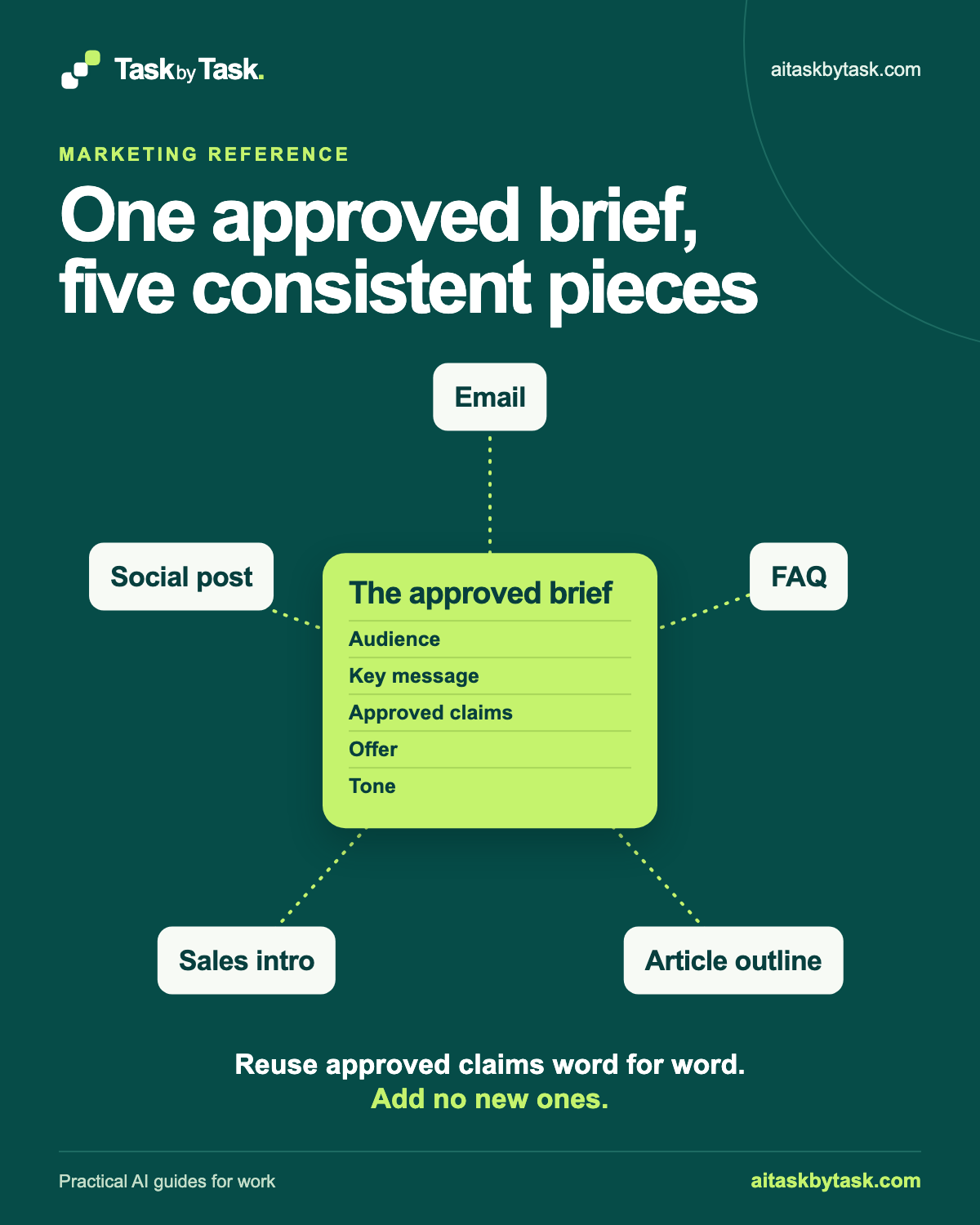
The idea is a hub and five spokes. The hub is the campaign brief: Audience, Key message, Signed-off claims, Offer and Tone. Each spoke is one piece made from that brief and nothing else. One rule holds it together: reuse signed-off claims word for word, and add no new ones.
AI is useful for the reshaping: the same facts fitted to an inbox, a feed, a question list and a conversation. What your business can promise stays a person’s decision, particularly where prices, guarantees, comparisons or customers’ money are involved.
Where to do this
| Tool | How to use this text method |
|---|---|
| ChatGPT | Paste the same campaign brief into a chat for each piece. |
| Claude | Paste the same campaign brief into a chat for each piece. |
| Copilot | Paste the same campaign brief into a chat for each piece. |
| Gemini | Paste the same campaign brief into a chat for each piece. |
1. Build the campaign brief
Write the brief before you open the chat. It doesn’t need to be long; it needs to be the single place every piece draws its facts from.
The most important part is Signed-off claims. A claim is anything a customer could hold you to: a price, a delivery time, a guarantee, a comparison, a feature, a cancellation term. Give each claim an ID, its exact wording, and a source or approver. If you can’t name either, the claim isn’t signed off yet. Leave it out until someone signs it off.
Also list what must not be said, such as “risk-free” or “cancel anytime”. Naming them once is easier than removing them five times.
THE CAMPAIGN BRIEF
Product or campaign:
Signed off by:              Date signed off:

AUDIENCE
Who it is for, and what they already know:

KEY MESSAGE
One sentence the reader should remember:

SIGNED-OFF CLAIMS (use word for word)
C1 "[exact wording]"   Source or approver:
C2 "[exact wording]"   Source or approver:
C3 "[exact wording]"   Source or approver:

OFFER
Price, what is included, conditions, end date:
Source or approver:

TONE
Three or four plain descriptions, with one example sentence:

DO NOT SAY
Phrases, claims or comparisons that are not signed off:

OPEN QUESTIONS
Anything not yet confirmed (leave out of all five pieces until answered):
Treat the offer like a claim: “half price” and “half price on orders over £20” are different promises.
If a claim makes a comparison or mentions health, the environment or a competitor, check with whoever approves your marketing before it goes in the brief. This method repeats signed-off claims consistently; it doesn’t decide whether a claim can be made at all.
Why this works: A sourced claims list gives every format the same facts to use.
What you should see: One brief with exact claims, conditions and unresolved questions.
2. Ask for one piece at a time
Paste the brief into a new chat and ask for one piece. Asking for all five at once makes checking harder, because you’re reviewing everything at the same time.
Below is an campaign brief. Use it as the only source of facts.

Rules:
- Use signed-off claims word for word. You may shorten the surrounding
  sentence, but not the claim.
- Do not add any claim, price, guarantee, comparison, statistic,
  testimonial or deadline that is not in the brief.
- Do not use anything listed under DO NOT SAY.
- Do not use anything listed under OPEN QUESTIONS.
- If the piece seems to need a fact the brief doesn't give, write
  [NEEDS APPROVAL: what is missing] instead of filling the gap.

After the draft, list each claim ID you used and quote where it appears.

Write the [piece] using the instruction below.
[Paste one output instruction.]

CAMPAIGN BRIEF
[Paste the brief.]
Replace [piece] with one piece name, [Paste one output instruction.] with its instruction from below, and [Paste the brief.] with your campaign brief. Leave [NEEDS APPROVAL: what is missing] as the instruction for marking a gap.
“Word for word” makes claims checkable: a claim matches the brief or it doesn’t. The placeholder gives a gap somewhere to go other than an invention. The claim list at the end saves hunting, but check it yourself; it can be wrong too.
Paste one of these five instructions into the prompt. Adjust lengths to your channels.
EMAIL
Subject line under 60 characters, then up to 150 words.
Lead with the key message. Include the offer exactly as written, with its
conditions. One call to action. No claims in the subject line that are
not in the brief.

SOCIAL POST
Up to 50 words. One or two signed-off claims only. Include the offer only
if its conditions fit; otherwise point to where they are.

FAQ
Five to seven questions this audience would ask. Answer only from the
brief. If the brief cannot answer a question, keep the question and write
[NEEDS APPROVAL] as the answer. Do not invent policies.

SALES INTRO
Up to 100 words, for a person to adapt and send themselves. Key message
plus one relevant claim. No pressure tactics or invented deadlines.

ARTICLE OUTLINE
A title and four to six section headings, each with one line on what it
covers and the claim IDs it uses. New facts the article would need go in a
separate "To research and approve" list, not in the outline.
For the next piece, continue in the same chat or start a fresh one with the brief pasted again. A fresh chat helps if pieces start borrowing each other’s wording.
Why this works: One piece at a time makes it easier to catch the first factual drift.
What you should see: A draft plus the claim IDs and quoted wording it uses.
3. Check each piece for new or altered claims
Read each draft with the brief beside it. Look for four kinds of drift:
- New claims: anything a customer could hold you to that isn’t in the brief.
- Altered claims: “before Thursday at noon” becoming “anytime”; “within the ring road” disappearing.
- Prices and offers: a changed amount, a dropped condition, a new deadline.
- Guarantees and comparisons: “guaranteed”, “best”, “fresher than the supermarket”, unless the brief signs it off.
Read the whole piece, not only the claims the tool lists. A new claim can arrive as a friendly adjective.
Ask for a specific repair, not a fresh draft. The final check below shows how to remove the unsupported cancellation and offer claims.
If the same fact keeps being invented, customers may genuinely need it. Ask the approver, add the answer to the brief and redraft, rather than making the prompt sterner.
Why this works: Reading the whole draft catches promises that the tool’s own claim list missed.
What you should see: Specific changes to remove unsupported wording before you move on.
4. Keep one claims check across all five
Once all five pass individually, check them together: one entry per claim or offer, with the five pieces listed beneath it.
CLAIMS CHECK — one entry per claim or offer

Claim ID and exact wording:
Email: exact / not used / changed
Social: exact / not used / changed
FAQ: exact / not used / changed
Sales intro: exact / not used / changed
Outline: exact / not used / changed
New claims found:
Checked by / date:
Mark each piece entry ✓ exact, – not used or ✗ changed. Not every piece needs every claim. You’re looking for any ✗, or any condition the pieces contradict.
Then a person signs off the set: whoever owns the offer, not the chat. For a final line-by-line pass, the proofreading guide shows how to tidy wording without changing what a document promises.
Why this works: Checking the set together catches inconsistent conditions across channels.
What you should see: Five formats with no changed claim, checked by the person who owns the offer.
Check the result
- Each used claim matches the brief word for word, including conditions.
- The offer has the same amount, contents and deadline in every piece.
- Open questions remain unanswered; no new guarantee or comparison appears.
- A person who owns the offer has checked the whole set.
The usual failure: a shorter draft swaps a precise term for a more attractive promise, such as “cancel anytime” or “first box free”.
In the social post, "cancel anytime" is not signed off. Remove it.
Remove "first box free" and every unsupported comparison or deadline.
Use C1 and C3 word for word and the offer exactly as written in the
brief. Keep the draft under 50 words. List any remaining claim that
you cannot trace to the brief.
Worked example: one bread box, five pieces
Fictional example. An invented small bakery is launching a Saturday delivery box. The business, people and figures are made up.
THE CAMPAIGN BRIEF
Product: Saturday Loaf Box
Signed off by: owner            Date signed off: 6 October

AUDIENCE
Regular café customers within the ring road who buy bread at weekends.

KEY MESSAGE
Saturday's bread, baked that morning and delivered to your door.

SIGNED-OFF CLAIMS
C1 "Baked on the morning of delivery"       Source: production schedule; head baker
C2 "Delivered on Saturdays, 8am to 11am"    Source: delivery rota; operations
C3 "Free delivery within the ring road"     Source: delivery price list; owner
C4 "Pause or cancel before Thursday at noon" Source: subscription terms v2

OFFER
£14 a week for two loaves and four rolls. First box half price (£7)
for orders placed by 31 October. Source: owner

TONE
Warm, plain, local. Example: "Bread for your Saturday breakfast."

DO NOT SAY
Organic. Best in town. Cancel anytime. Free trial. Any comparison with supermarkets.

OPEN QUESTIONS
Gluten-free options (not confirmed). Delivery outside the ring road.
An illustrative first draft of the social post read: “Freshly baked bread delivered every Saturday morning! Cancel anytime and get your first box free. Better than anything from the supermarket. Order now, limited spaces!”
Checked against the brief, nearly every sentence has drifted:
- “Freshly baked” is a softened C1. Put back “Baked on the morning of delivery”.
- “Every Saturday morning” is a loose version of C2. Use C2 in full or leave delivery times out.
- “Cancel anytime” is on the DO NOT SAY list and contradicts C4.
- “First box free” changes the offer. It’s half price, until 31 October.
- “Better than anything from the supermarket” is a comparison nobody approved.
- “Limited spaces” is a new claim nobody has confirmed.
The repaired social post is the short version shown at the start of this guide. It uses C1 and C3 word for word and the offer in full; C2 and C4 are not used. Delivery wording is omitted rather than paraphrased.
The FAQ draft answered “Do you do gluten-free?” with [NEEDS APPROVAL], which is right: it’s an open question. After the repair, the claims check shows C4 as “– not used” for the social post and the offer as ✓ wherever it appears. The owner signs off the set.
Go deeper
You can stop once the five pieces pass the claims check. These sections help when the brief is reused or changes.
Keep the tone consistent without bending claims
“Make it more exciting” is an invitation to add “amazing” and “guaranteed”. Ask for tone changes separately, and pin the claims down:
Adjust the tone of the email to match the TONE section of the brief.
Do not change any signed-off claim, the offer or its conditions. After the
revision, list every sentence containing a claim ID and confirm it still
matches the brief word for word.
If you want a fuller voice brief for your organisation, make an AI draft sound like you shows how to build one from writing you already use.
Ask AI to find claims you missed
A second pass can surface sentences that work as claims without looking like one. Treat the answer as a list to check, not a verdict.
Compare the draft below with the campaign brief. List every sentence that
a customer could treat as a promise, price, guarantee, comparison or
factual statement about the product. For each, say which claim ID
supports it, or "not in brief". Do not rewrite anything.
AI answers can look correct and still be wrong, so check anything marked as supported against the brief yourself.
Update the brief when something changes
When a price, date or term changes, change the brief first (with a new date and approver), then edit the affected pieces and rerun the claims check on everything still in use. An old FAQ with last month’s offer is the piece customers will find.
If a design tool adds headline text, check that against the claims list too. The packaging concept guide shows how to map every word on a design back to the brief.
Sources
Anthropic’s support article Claude is providing incorrect or misleading responses. What’s going on? supports the point that AI answers can look correct while being wrong, and should be checked. The brief, output instructions and claims check are an editorial method, not a tested workflow or legal advice on marketing claims.