Transcribe handwritten notes without guessing the gaps
The date is inked over and a quantity has been crossed out. A tidy transcription that quietly guesses both is less useful than a rough one that tells you what still needs checking.
What you'll make
a literal transcription of a handwritten note, with unreadable and crossed-out text marked, and a short list of what still needs the author’s confirmation.
What you'll need
a ChatGPT, Claude or Gemini chat in your work account that accepts images, a photo or scan of a note you’re allowed to upload, the original to hand, and about ten minutes.
Example result.
Exhibition stand prep
Shelf: Maple
Date: [unreadable]
Display boxes: 5 [crossed out], 8 written beside it
Test lamp before use
Owner: not agreed
To confirm with author: date; whether 8 replaces 5
1. Photograph the page and check what’s on it
Photograph the page flat, in daylight, with the whole page and its edges in frame. In ChatGPT on the web you can attach, paste or drag the image into the message box; in Claude, use the + button and Add files or photos; on a phone, the app’s attach menu usually offers the camera. Check focus, glare and rotation before uploading.
Notes often carry names, phone numbers or private details outside the bit you care about. Check what you’re allowed to put into an AI tool at work before uploading. Keep the full image even if you crop a detail later, so a nearby correction or heading isn’t lost.
Why this works: most transcription errors start with a poor photo, not a poor model.
What you should see: a sharp, upright image of the whole page.
2. Ask for the words before any interpretation
Attach the image and send:
Transcribe the attached note literally. Keep its line order, wording and correction marks. Mark unreadable text as [unreadable] and uncertain readings as [uncertain: possible reading]. Do not invent dates, names, quantities or missing words. If text is crossed out, record that rather than deleting it. Keep any interpretation separate from the transcription. Do not extract or assign actions yet.Don’t combine transcription, summary and actions in one request when the writing is uncertain. And don’t give a guessed date as “context” when the point is to find out what the date says.
Why this works: the markers show you exactly where to look, and keeping interpretation separate stops a suggested meaning being mistaken for the page.
What you should see: the note line by line, with any gaps or crossings-out marked in brackets.
3. Compare every line that matters
Read the transcription beside the original. Check names, dates, quantities, units and small words such as “not”, “before” and “optional”. A missing “not” matters more than a spelling slip. For a long note, list the passages you checked and the ones you didn’t, rather than claiming you checked it all.
If something is genuinely unreadable, keep the marker and ask the author. The assistant’s confidence doesn’t restore missing ink.
Why this works: the lines people act on are the ones worth your time.
What you should see: every consequential line ticked against the page, and a short “to confirm” list.
Check the result
- Every line on the page appears in the transcription, in order.
- Crossed-out text is recorded, not deleted.
- Nothing is filled in that you can’t see: no date, owner or missing word.
- Interpretation, if any, sits apart from the transcription.
The usual failure: a silent tidy-up. The transcription reads cleanly because it has dropped what was hard: the crossed-out number disappears, an unreadable line vanishes, or a guess fills the gap (“Date: 15 November”). Spot it by counting lines against the page and looking for every correction mark. Then crop the passage and ask:
Re-examine this passage: [location]. The previous transcription gave [reading], but the source does not clearly support it. Use the attached detail and the original image. List possible readings only if visible marks support them; otherwise keep [unreadable]. Do not choose a date or quantity because it would fit the task.[location] is where on the page (for example “third line, after Date:”) and [reading] is what the transcription said.
Worked example: an unreadable date stays unreadable
Fictional example. Download the practice note and try the step 2 prompt on it.
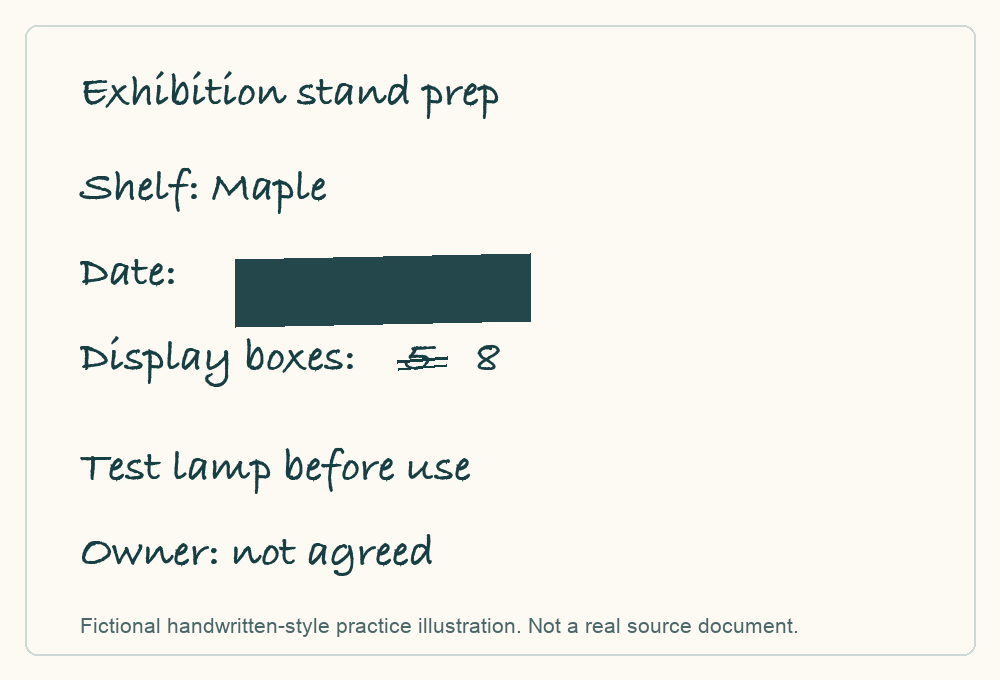
A first transcription came back as:
Exhibition stand prep
Shelf: Maple
Display boxes: 8
Test lamp before use
Owner: not agreed- The failure. Five lines for a six-line note: the date line has gone, and the crossed-out 5 has been deleted rather than recorded. Both read as cleaner, and both lose something the author may need to explain.
- The repair. The re-examine prompt on the date line and the quantity line restored “Date: [unreadable]” and “5 [crossed out], 8 written beside it”, as in the example result.
- What it didn’t do. It didn’t guess a date or decide that 8 is final. Those go on the “to confirm” list for the author.
Task kit for this job: Download (ZIP) · Reusable instructions
Go deeper
Extract actions only from the checked transcription
Once the transcription is checked, ask for actions from that text, not from the image:
Using only the checked transcription below, list explicit actions and unresolved information separately. Keep missing dates and owners missing. Do not treat a crossed-out or uncertain value as a confirmed instruction. Quote the supporting line for each action.

[checked transcription]
“The note says test the lamp” is different from “a named person has agreed to test it”. Use ChatGPT to extract actions from meeting notes covers this in more depth.
Keep an uncertainty record for important notes
For each uncertain passage, note its location, the possible reading, why it’s uncertain and who can confirm it. “Second line below the heading” is more useful than “near the top”. Several AI readings that agree aren’t corroboration; the original or the author is.
Keep any clean version separate
If you need a tidy version for others, keep it apart from the literal transcription and label the edits. Fixing spelling is harmless; silently changing a quantity or an ambiguous name is a different job. For screenshots rather than handwriting, see Give AI a screenshot and ask the right question.